
Dial-Up Internet Sound Explained: 300 bps to 56K
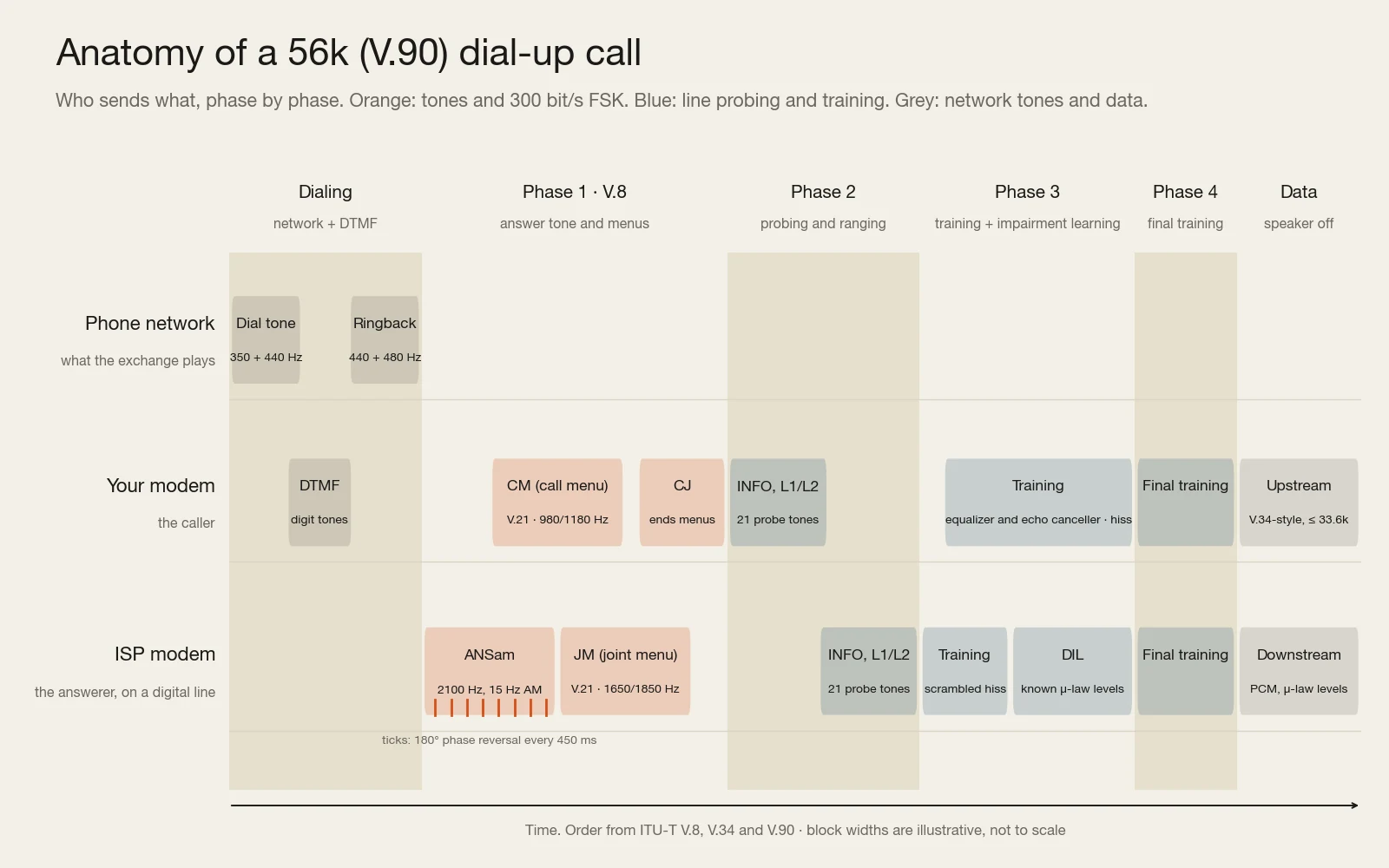
The dial-up internet sound is two modems negotiating over a telephone line. Your modem dials the number with touch tones, the modem at the other end answers with a steady 2100 Hz tone, the pair swap lists of what they support in short bursts of chirping, test the line with a chord of pure tones, then train their receivers on bursts of noise until the hiss settles into data. It was loud because the phone network could only carry sound, and you heard it because the modem’s speaker was left on until the connection came up.
What the dial-up sound actually is
A dial-up modem is a modulator–demodulator: it turns bits into audio a phone line can carry and turns the audio coming back into bits. Every part of the noise you remember is one of those two jobs, done in public. The beeps are the phone number. The steady whistle is the answering modem announcing itself. The warbling chirps are short data messages sent very slowly, at 300 bits per second, because nothing has been agreed yet and slow is safe. The rising, jangling chord is a set of test tones measuring the line. The long hiss is the two modems training their equalizers and echo cancellers on scrambled data, which deliberately sounds like noise.
The timeline below lays out a 56k (V.90) call, the version most people heard last, in the order the standards specify. The sections after it take each phase in turn, then go through the modem standards one by one, from the 300 bit/s Bell 103 of 1962 to 56K.
Why modems had to make noise at all
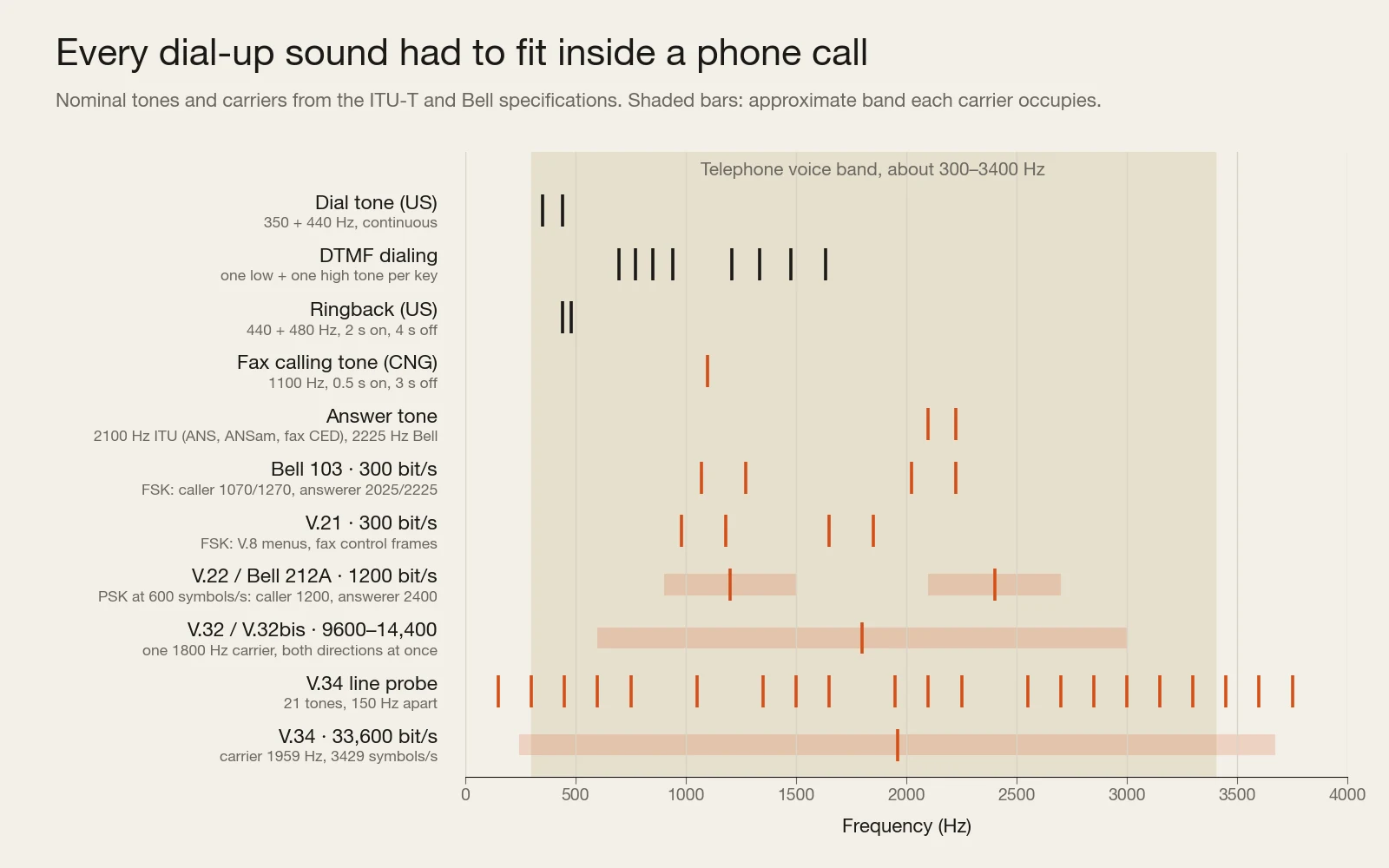
The telephone network was built to carry one thing: a human voice, intelligibly. The usable voice band runs from roughly 300 to 3400 Hz. Once calls between exchanges went digital, each call was sampled 8,000 times a second as 8-bit codes, 64,000 bits per second per call, and anything outside that band was filtered off before it got there. There was no way to plug data straight into the network from a home phone line. Whatever a modem wanted to send had to be disguised as sound that fits inside a phone call.
So modems spoke in tones. The earliest switched between two pitches, one for a 1 and one for a 0. Later designs changed the phase and amplitude of a single carrier tone thousands of times a second, packing several bits into each change. However clever the coding, the output was always audio in the 300–3400 Hz window, which is exactly why you could listen to it, and why it sounded like a fax machine, a phone keypad and a detuned radio all at once: they were all made of the same raw material.
The network also contained equipment designed to make conversations sound better that is poison to data. On long-distance circuits, echo suppressors cut the return path while one person was talking, so you would not hear your own voice bounce back; later, echo cancellers subtracted an estimate of the echo instead. Both assume only one side talks at a time. A modem sending in both directions at once needed them out of the way, and the answer tone is how it asked.
The modem handshake, step by step
What you heard during a 56k call, in order
Speaker on the default setting, ATM1 · V.8, V.34 and V.90 start-up
- Off hook, dial tone. The modem picks up the line and the exchange answers with US dial tone, 350 Hz and 440 Hz played together. By default, most Hayes-compatible modems waited to hear it before dialing.
- Touch-tone dialing. Each digit is a DTMF pair: one low tone (697, 770, 852 or 941 Hz) plus one high tone (1209, 1336, 1477 or 1633 Hz). These are the same sounds a phone keypad makes.
- Ringback. While the far end rings, the network plays 440 + 480 Hz, two seconds on and four off.
- Answer tone (ANSam). The answering modem sends a 2100 Hz tone, gently amplitude-modulated at 15 Hz to say “I speak V.8”, with a 180° phase flip every 450 ms. The tone turns off echo suppressors; the phase flips, heard as faint clicks or snaps in the whistle, turn off echo cancellers.
- V.8 menus. The caller sends a Call Menu (CM) listing the modulations it supports, the answerer replies with a Joint Menu (JM) of what they share, and the caller confirms with CJ. All three are sent as 300 bit/s FSK, using the V.21 tone pairs: 980/1180 Hz from the caller, 1650/1850 Hz from the answerer. This is the fast, bubbly chirping.
- Probing and ranging. The modems exchange short INFO messages at 600 bit/s, ping each other with 1200 Hz and 2400 Hz tones to measure the round-trip delay, then each sends the line probe: 21 tones spaced 150 Hz apart from 150 to 3750 Hz, with 900, 1200, 1800 and 2400 Hz left out. That is the chord. The receiver measures how much each tone was weakened and picks a symbol rate and carrier frequency to suit this particular line.
- Training. Long runs of scrambled data let each modem tune its equalizer, which undoes the line’s frequency response, and its echo canceller. Scrambled data has a flat, noise-like spectrum, so this is the hiss. In a V.90 call the ISP side also sends a digital impairment learning sequence of known signal levels, so your modem can learn what the digital network does to them.
- Final training and data. The modems exchange their chosen parameters, run a last round of training, and switch to data. Data is scrambled too, so the line would have kept hissing for as long as you were online.
- Silence. On the default setting the speaker turns off the moment the modem detects a carrier, so the hiss stops and the connection begins.
Some modems also ran a V.8bis exchange, a separate capability negotiation from 1996, before or instead of parts of the V.8 step, so recordings from different hardware differ in the details.
Why the answer tone has snaps in it
The plain 2100 Hz answer tone is older than the internet. It comes from the ITU-T V.25 answer procedure, and network echo suppressors are built to switch themselves off when they hear it. Echo cancellers needed a stronger signal, so the tone can carry 180° phase reversals every 450 ms; a canceller that sees a pure tone with those reversals disables itself for the call. V.8 added the 15 Hz amplitude wobble so a calling modem could tell a modern V.8-capable answerer from an old one, and a fax machine’s plain 2100 Hz tone from both.
Why the speaker went quiet, and how to silence it
The speaker was a diagnostic tool. Hearing the line told you instantly whether you had a busy signal, a wrong number with a person saying “hello?”, or a fax machine. It was controlled by Hayes AT commands, the command set that began with the Hayes Smartmodem in 1981 and became standard: ATM0 turned the speaker off entirely, ATM1 (the usual factory default) kept it on until carrier was detected, ATM2 left it on for the whole call, and ATL0 to ATL3 set the volume. In Windows, the modem’s properties had a speaker volume slider and an extra-settings field where people put ATM0 to get a silent connection.
Modem standards from 300 bps to 56K
Each new standard squeezed more data into the same 3 kHz of bandwidth, and each one sounds different on the line. The table is the short version; the sections below explain what changed each time.
| Standard | Year | Speed | How it modulates | What it sounds like |
|---|---|---|---|---|
| Bell 103 | 1962 | 300 bit/s | FSK: two tone pairs, one per direction | A fast, warbling two-note trill |
| V.21 | 1964 | 300 bit/s | FSK on 980/1180 and 1650/1850 Hz | The same kind of trill; survives in V.8 menus and fax control |
| Bell 212A / V.22 | late 1970s / 1980 | 1,200 bit/s | Phase-shift keying, 600 symbols/s, carriers at 1200 and 2400 Hz | A rough, buzzy hiss |
| V.22bis | 1984 | 2,400 bit/s | 16-point QAM at 600 symbols/s | Buzzy hiss |
| V.32 | 1984 | 9,600 bit/s | QAM at 2400 symbols/s on 1800 Hz, trellis coding, echo cancellation | Broadband hiss after a longer training |
| V.32bis | 1991 | 14,400 bit/s | 128-point trellis-coded QAM | Broadband hiss |
| V.34 | 1994 / 1996 | 28,800 / 33,600 bit/s | Adaptive: up to 3429 symbols/s, shell mapping, precoding | Line-probe chord, then a long hiss |
| V.90 | 1998 | 56k down (53.3k in the US), 33.6k up | PCM levels downstream, V.34-style upstream | V.34 sounds plus an extra learning phase |
| V.92 | 2000 | 56k down, up to 48k up | PCM both ways, Quick Connect, Modem on Hold | Shorter start-up on lines it remembers |
Bell 103 and V.21: two tones per direction
AT&T’s Bell 103 of 1962 used frequency-shift keying. The calling modem sends 1270 Hz for a 1 and 1070 Hz for a 0; the answering modem uses 2225 Hz and 2025 Hz. Because the two pairs sit in different parts of the band, both sides can talk at once, full duplex, with simple filters keeping them apart. At 300 bits per second you can almost hear the individual bits. The international V.21 did the same thing on 980/1180 and 1650/1850 Hz, and that pair outlived every faster standard: V.8 menus and fax control messages are still sent with it, which is why every later handshake starts with the same kind of chirping.
Bell 212A, V.22 and V.22bis: phase instead of pitch
Bell 212A and its ITU twin V.22 reached 1,200 bit/s by keeping one carrier per direction, 1200 Hz from the caller and 2400 Hz from the answerer, and shifting its phase 600 times a second, two bits per shift. They are not interchangeable: Bell 212A answers with a 2225 Hz tone and falls back to Bell 103; V.22 answers with 2100 Hz and adds a 600 bit/s mode. V.22bis (1984) kept the 600 symbols per second but varied amplitude as well as phase, 16 points, four bits per symbol, for 2,400 bit/s. Phase-modulated data needs a scrambler so long runs of identical bits do not turn into a steady tone, and scrambling, together with the faster symbol rate, is why the trill of 300 baud gave way to a hiss.
V.32 and V.32bis: both directions in the same band
Splitting the band in half caps the speed of each direction. V.32 (1984) stopped splitting it: both modems transmit across the whole channel on an 1800 Hz carrier at 2400 symbols per second, and each removes its own transmission from what it hears with an echo canceller, an adaptive filter that learns the shape of the echo and subtracts it. It also introduced trellis coding, which adds a redundant bit so the receiver can correct likely errors by choosing the most plausible path through a sequence of symbols. That gave 9,600 bit/s; V.32bis (1991) pushed the constellation to 128 points for 14,400 bit/s. A modem that has to learn the echo needs a longer training period, so the hiss before connecting got longer. When the line changed mid-call, these modems could stop and retrain.
A synth phrase, dry and through Telecom’s V.32BIS engine with retraining enabled. This is music processed by our plugin, not a recording of a modem: the hiss and dropouts are what a struggling link does to audio sent as data, not the sound of the handshake itself.
V.34: measuring the line before using it
Earlier standards assumed a generic phone line. V.34, approved in 1994 at 28.8k and extended to 33.6k in 1996, measures the actual line first: that is what the line-probe chord is for. From the result it picks one of six symbol rates, from 2400 to 3429 symbols per second, and a carrier to match; at 33.6k that is 3429 symbols per second on a 1959 Hz carrier, which spreads the signal from roughly 245 Hz to 3.7 kHz, past the nominal edge of the voice band. It also uses shell mapping, which favors low-energy constellation points to gain a little signal-to-noise margin, and precoding, which pre-distorts the signal to cancel the line’s response before it happens.
At 33.6k, V.34 is close to the theoretical Shannon limit of an analog phone channel. Much of that limit comes not from crackle on the copper but from the exchange itself: every time your analog signal is digitized to 8-bit codes, rounding to the nearest code adds quantization noise. That detail is what made 56K possible.
V.90 and V.92: 56K by speaking the network’s own codes
The trick behind 56K was to stop treating the network as an analog channel. An ISP connected digitally, over T1, E1 or ISDN trunks, can send the exact 8-bit codes the network uses for telephone audio: μ-law in North America and Japan, A-law elsewhere, both from the G.711 standard. Those codes travel untouched to your local exchange, where a converter turns them into voltages on your copper line. Your modem samples the voltage and works out which code was sent. Because the sender chose codes the network already uses, there is no rounding on the way down, so no quantization noise. The catch is that only one analog-to-digital conversion is allowed anywhere in the path; a line that passed through a second one fell back to V.34 speeds.
The arithmetic is 8,000 codes per second times 7 bits. Not 8, because some North American trunks steal the lowest bit for signaling in every sixth frame (robbed-bit signaling), and because the quietest levels sit too close together to tell apart reliably on a noisy line. The upload could not use the trick, because your modem sends an analog signal that the exchange digitizes, quantization noise and all, so V.90 sent upstream with V.34 techniques at up to 33.6k. V.92 (2000) added a PCM upstream mode of up to 48k, a Quick Connect that remembered the line from the last call to shorten the handshake, and Modem on Hold for call waiting.
The 56k connection also explains the extra phase you hear in a V.90 handshake. During digital impairment learning, the ISP modem sends sets of known μ-law levels and your modem records what actually arrives, learning where robbed-bit signaling and level-adjusting digital pads have bent them. It is one more stretch of structured noise between the chord and the final hiss.
The same demo track dry and through Telecom’s V.90 engine at its default settings, which pair it with a μ-law (G.711) codec. Processed music, not a modem recording. Both files are the same length and stay in sync when you switch.
Is 56K really 56K?
No. 56,000 bit/s was the ceiling of the coding scheme, and in the US the ceiling sat lower than that. FCC rules limit how much signal power can be put on a phone line, which rules out the loudest μ-law levels; without them, the fastest rate a V.90 modem could negotiate in the US was 53.3k (53,333 bit/s), and connection reports came in steps of about 1,333 bit/s below that. Long loops, a second analog conversion, or noisy wiring all pushed the real number further down, and the upload stayed at 33.6k or less until V.92. V.90 itself replaced two incompatible vendor schemes that came first, US Robotics’ X2 and K56flex.
Why fax machines screech
A fax machine is a modem with a scanner and a printer attached, and its call follows the ITU-T T.30 procedure. Most Group 3 fax machines, the kind standardized with the T.4 page format in 1980 and still in offices today, go through the same audible steps:
- CNG, the calling tone. The sending machine beeps at 1100 Hz, half a second on and three seconds off, so a person or a combined phone/fax box knows a fax is calling.
- CED, the answer tone. The receiving machine answers with a 2100 Hz tone lasting about three seconds. It is the same frequency as a modem’s answer tone and does the same job of disabling echo suppressors.
- DIS and DCS. The receiver announces its capabilities (speeds, resolutions, page widths, compression) in HDLC frames sent at 300 bit/s with V.21 FSK on 1650/1850 Hz. The sender answers with the settings it chose. These frames are the harsh, rasping squeal most people mean by “fax noise”, and if you call a fax line by mistake, this is the noise you hear.
- Training check. The sender switches to the faster page modem and sends a training sequence and a test pattern; if the receiver confirms it, the page follows. If not, they step down to a slower speed and try again.
- Page data. The scanned page goes out with V.27ter (2,400 or 4,800 bit/s), V.29 (up to 9,600) or V.17 (up to 14,400), compressed with T.4 Modified Huffman run-length coding. It sounds like a flat, steady hiss.
- Post-page messages and hang-up. Short V.21 exchanges confirm the page and signal either another page or the end of the call, so the chirping returns before the line drops.
A standard-resolution fax page is 1728 pixels across at 204 by 98 dots per inch; fine mode doubles the vertical resolution to 196. Modified Huffman coding was designed for mostly white paper, which is why a page of text went in seconds and a photograph took far longer. Later Super G3 machines use V.34 at up to 33.6k, and they start their calls with the V.8 answer tone and menus, so a modern fax handshake sounds much more like a modem than an old one does.
A synth part dry and through Telecom’s FAX engine on a bad line, where the audio is turned into a T.4-style fax page and read back. This is not a fax handshake recording; it is what happens to sound when it travels as a printed page.
Hearing the speeds side by side
You cannot play music through a real dial-up handshake, but you can hear what each speed means for audio sent as data. Telecom, the plugin we make, treats a modem standard as a pipe: audio is encoded by a codec, carried by a simulated link of that standard, and decoded on the other side. A slow link leaves the codec very few bits, so it has to throw most of the sound away. We rendered one demo track through several of its engines at default settings on a clean line and measured the results.
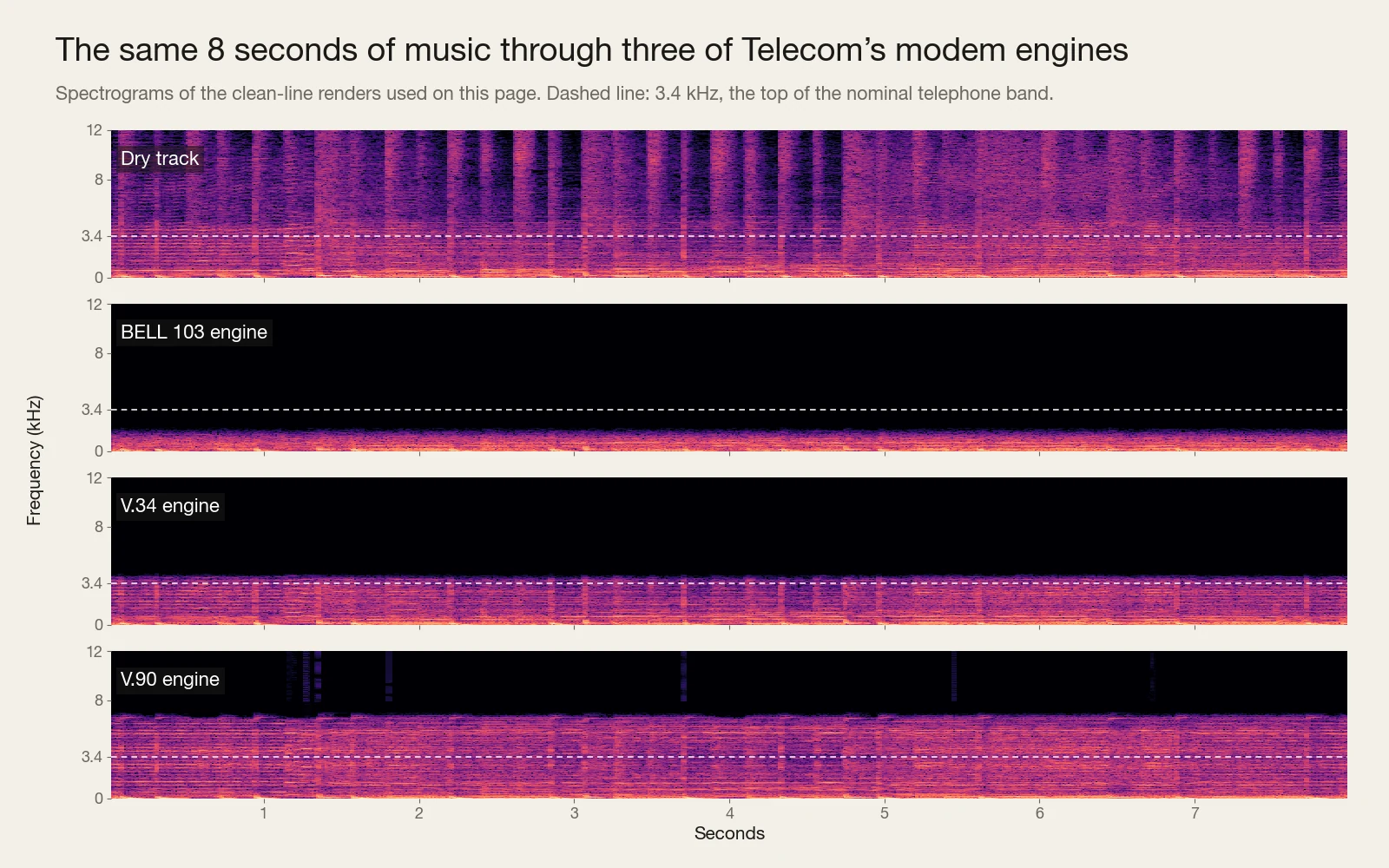
The spectrograms show the trade plainly. Through the BELL 103 engine, almost nothing above about 2 kHz survives, and the track becomes a dull, muffled outline of itself. The V.34 engine keeps everything up to about 4 kHz, close to a phone call. The V.90 engine reaches about 7 kHz, noticeably brighter than either, but nowhere near the dry file. Switch between the two below: same track, same position, roughly a hundredfold difference in link speed.
The same demo track through Telecom’s BELL 103 and V.34 engines on a clean line. Processed music, not modem recordings; what changes is how much of the music a 300 bit/s link and a 33.6k link can carry.
The dial-up sound, pictured
The best visual explanation of the handshake is Oona Räisänen’s 2012 post The sound of the dialup, pictured. She recorded a real connection and annotated its spectrogram section by section: the dial tone, the DTMF digits, the answer tone and its phase reversals, a V.8bis exchange, the modulation negotiation, the probing tones and the scrambled training data. If you want to see where each sound in this article sits in an actual recording, it is the place to go; our timeline above is a schematic of the standards, hers is a picture of one real call.
How musicians use modem sounds now
Dial-up has outlived its use as a network. AOL switched off its dial-up service on September 30, 2025, after 34 years. The sound stayed. Producers use it in three fairly different ways, and it helps to know which one you are after.
The handshake as a sample
A recording of a real connection, used as a riser, a transition or a texture. Use a recording whose license covers your release, or record one yourself with a working modem on a phone line and the speaker set to ATM2.
The telephone band as EQ
Band-pass a vocal or a drum loop to roughly 300–3400 Hz and it sits “on the phone”. Free, quick, and the reason a phone effect works at all, but it only imitates the bandwidth, not what digital transmission does.
Codecs and bit reduction
Reducing bit depth and sample rate gives the familiar crunch of a bitcrusher. Codecs such as μ-law, ADPCM or LPC-10 throw information away according to a model of speech or of the signal, so they fail in more characterful ways.
Transmission errors
Dropouts, retrains, packet loss and bit errors: the sound of a connection struggling. This is the part that is hardest to fake with EQ and a crusher, because it depends on what the receiver does when it loses the signal.
If the bit-reduction end is what you want, our guide to the best bitcrusher plugins compares paid and free options. Codec degradation is the neighboring idea: a bitcrusher reduces resolution evenly across the signal, while a codec spends its bits where its model says they matter, so the damage lands in different places.
The other two ends are what Tapechild built Telecom for, and since it is our own product, here is plainly what it does and does not do. It is a $69 lo-fi degradation plugin (VST3, AU and standalone) with 13 transmission engines, including BELL 103, V.22BIS, V.32BIS, V.34, V.90 and FAX alongside CELL, RADIO, TAPE, DISC and STREAM, and 14 codecs, among them μ-law G.711, G.726 ADPCM, GSM FR, LPC-10, CVSD and FAX T.4. On its AUTO setting each engine picks its historically matched codec, so V.90 runs μ-law and FAX runs T.4, and any codec can ride on any engine. Its V.90 engine’s speed settings top out at 53,333 bit/s, the same ceiling a real US 56K connection hit. What it does not do is play handshake recordings: if the literal connect sound is what you need, use a recording.
Frequently asked questions
Why did dial-up internet make noise?
Because the phone line could only carry audio in roughly the 300–3400 Hz voice band, so modems had to turn data into sound. The noise you heard was the two modems setting up the call: the answer tone, short 300 bit/s negotiation messages, line-probing tones and scrambled training data. The modem’s speaker played it so you could tell if something went wrong, then switched off once the connection was made.
What is the 2100 Hz tone at the start of a modem or fax call?
It is the answer tone sent by the modem or fax machine that picks up. Hearing it, echo suppressors on the line switch themselves off, and its 180° phase reversals every 450 ms switch off echo cancellers, so both ends can transmit at once. Modern modems add a 15 Hz amplitude modulation, called ANSam, to signal that they support V.8 negotiation.
Could you turn the dial-up sound off?
Yes. The speaker was controlled with Hayes AT commands: ATM0 turned it off, ATM1 kept it on only until the connection was made, ATM2 left it on all the time, and ATL0 to ATL3 set the volume. In Windows you could add ATM0 to the modem’s extra settings or turn the speaker volume down in its properties. The modems still made the same signals on the line; you just stopped hearing them.
Why do fax machines screech?
The screech is mostly the fax control messages of the T.30 procedure, sent as 300 bit/s FSK on 1650 and 1850 Hz, after a 2100 Hz answer tone. The sending machine also beeps at 1100 Hz to announce itself. The page itself is sent with a faster modem (V.27ter, V.29 or V.17) and sounds like a steady hiss rather than a screech.
Is 56k really 56k?
Not in practice. 56,000 bit/s is the theoretical top of the V.90 scheme, 8,000 samples a second times 7 bits. In the US, FCC limits on the power a line can carry ruled out the loudest levels and capped connections at 53.3 kbit/s, and most lines connected lower than that. Uploads stayed at 33.6 kbit/s at best until V.92 added a faster upstream mode.
How long did the dial-up handshake take?
It varied with the modems and the line. A full V.90 start-up commonly took 20 seconds or more from dialing to connection. V.92 added Quick Connect, which stored what the modem had learned about the line on the previous call and reused it, to cut the training part of the handshake substantially.
Royalty-free WAV
Free sample packs
Royalty-free WAV, play every sample before you download.