
Best Bitcrusher Plugins in 2026: Free, Paid and Built-In
A bitcrusher throws information away on purpose. It either rounds every sample to fewer amplitude levels, or holds samples for longer than it should, or both. That sounds like a one-knob effect, and the free ones mostly are, but the way a plugin throws information away is the whole difference between a cheap-sounding crunch and the grit of an old sampler, a phone line or a 2400-baud modem. This guide explains what is happening under the knobs, then compares the plugins worth installing.
The short answer
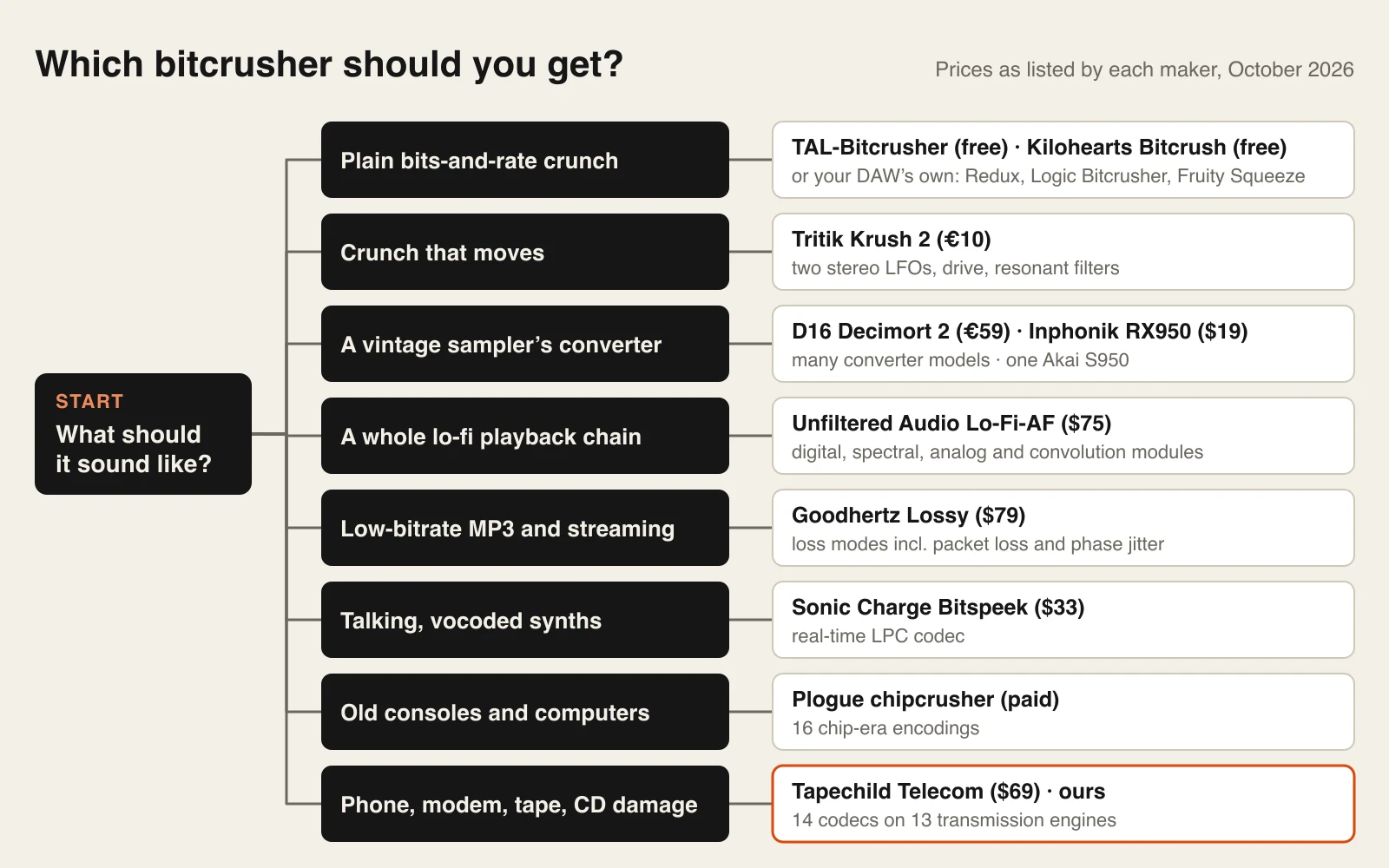
- Best free bitcrusher: TAL-Bitcrusher — bits, sample-rate reduction, noise and tone in one window, on macOS, Windows and Linux. Kilohearts Bitcrush is the alternative if you want dither and converter-quality controls, and it costs only an account.
- Best paid all-rounder: D16 Decimort 2 (€59). Two quantiser types, adjustable jitter, switchable anti-alias filters and models of classic sampler converters — the most control over how the signal is reduced.
- Best for one specific vintage sampler: Inphonik RX950 ($19), a model of the Akai S950’s 12-bit conversion.
- Best for the sound of compressed internet audio: Goodhertz Lossy ($79), which imitates low-bitrate MP3s and dropped packets.
- Best for codec and transmission damage: Tapechild Telecom ($69) — our own plugin — which runs audio through historical codecs and emulated modems, tape, CDs and radio.
- Already own a DAW? Ableton’s Redux, Logic’s Bitcrusher, Cubase’s Bitcrusher and FL Studio’s Fruity Squeeze are all real bitcrushers. Try yours before buying anything.
One disclosure before the list: Tapechild makes Telecom, and this article is published on the Telecom maker’s site. It is included because it is a bitcrusher in the broad sense, and the section on it says plainly where a free plugin is the better choice.
What a bitcrusher actually does
Digital audio stores a waveform as a list of numbers. Two settings decide how faithful that list is: the bit depth, which sets how many amplitude levels each number can take, and the sample rate, which sets how many numbers are taken per second. A bitcrusher lowers one or both, inside a project that is still running at 44.1 kHz or more with 32-bit floating-point math. The two reductions sound completely different, so it pays to hear them separately.
Bit-depth reduction: quantisation and stepping
Each bit doubles the number of available levels and adds roughly 6 dB of dynamic range. Sixteen bits gives 65,536 levels and about 96 dB; eight bits gives 256 levels and about 48 dB; four bits leaves 16 levels and about 24 dB. When a sample falls between two levels it is rounded to the nearer one, and the rounding error becomes part of the signal.
At moderate settings that error behaves like hiss. At low bit depths it stops being random: the error follows the waveform, so it turns into harmonic distortion and a gritty, gated fizz. The giveaway is what happens to quiet material. A loud snare hit spans many levels and stays recognisable, but its decay crosses fewer and fewer of them as it fades, so the tail breaks up into a buzzy staircase and finally cuts to silence. That is why a crushed reverb tail sounds like a dying gate, and why the same setting sounds harsher on a quiet stem than on a loud one.
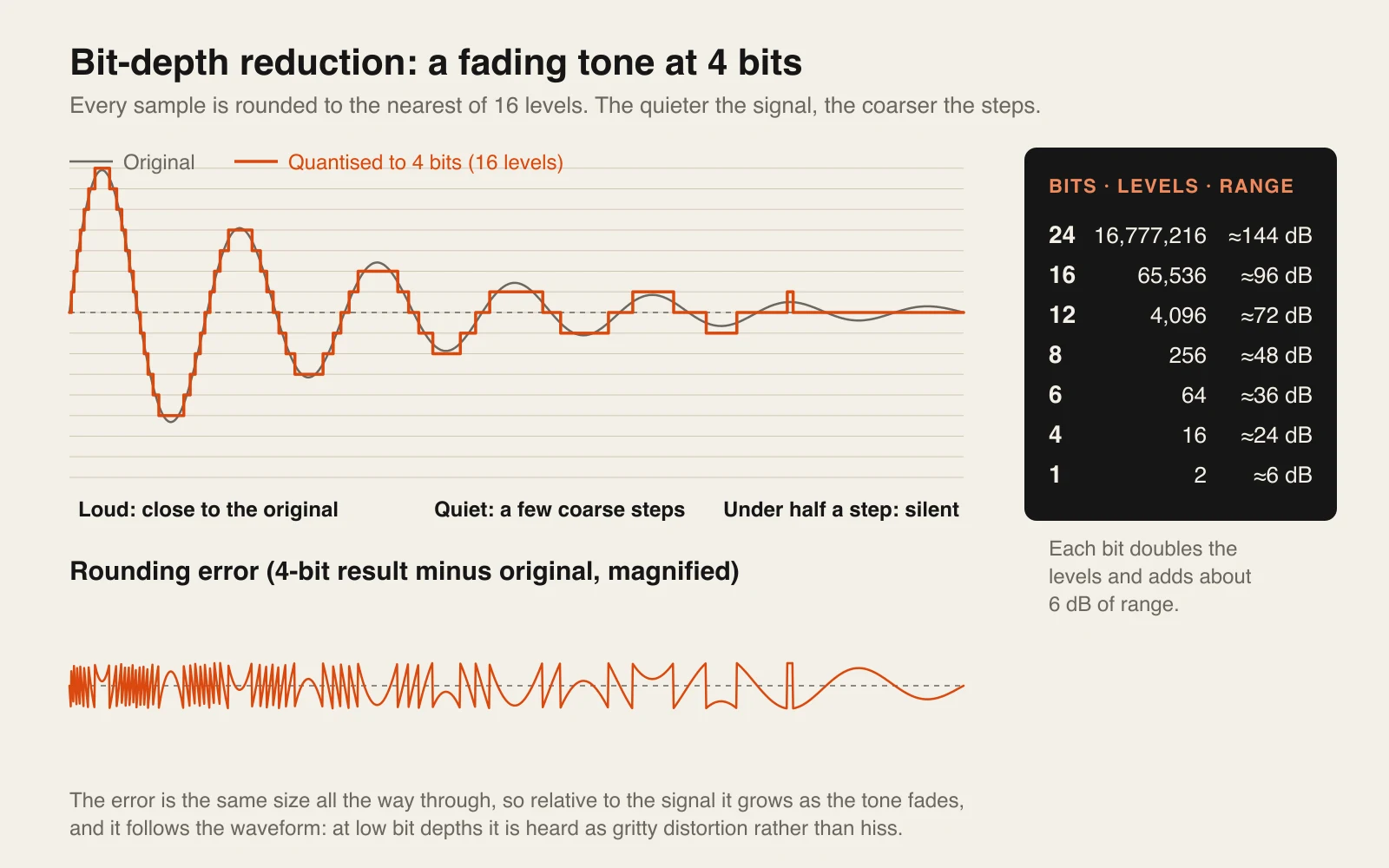
It also means input gain is a crush control. Feed a fixed-point crusher a hotter signal and the waveform uses more of the available levels, so it sounds cleaner; turn the input down and the same Bits setting sounds rougher. Logic’s Drive knob and most plugins’ input trims are as much a part of the effect as the Bits control itself.
Sample-rate reduction: aliasing and foldover
A digital system can only represent frequencies below half its sample rate — the Nyquist limit. A proper converter filters everything above that limit out before sampling. A bitcrusher usually does not: it just holds each sample for several sample periods, a sample-and-hold, and lets whatever is above the new Nyquist limit fold back into the audible band. Reduce the rate to 8 kHz and a 5 kHz partial reappears at 3 kHz.
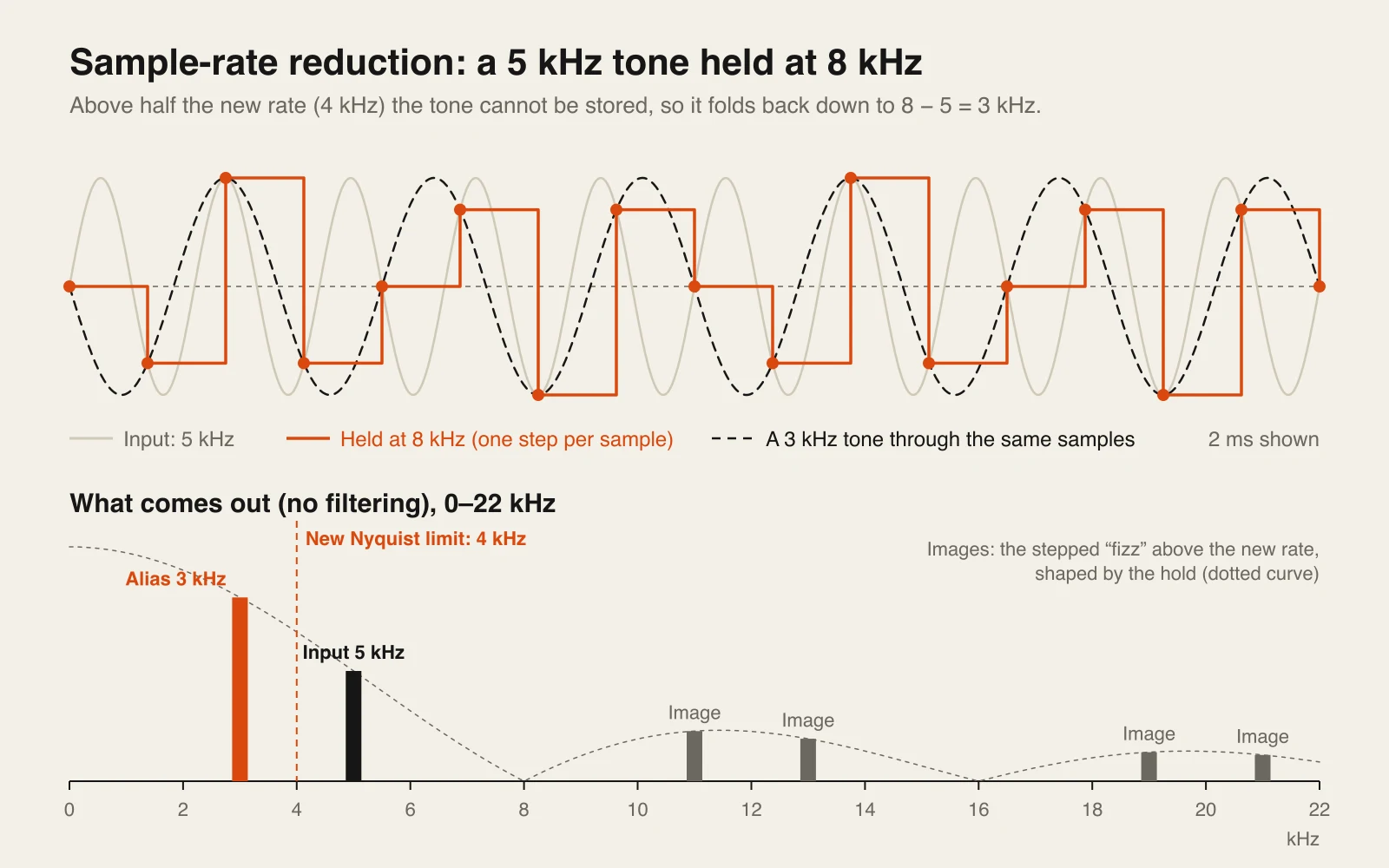
Those folded partials are not harmonically related to the note being played, which is where the metallic, ring-modulated clang of heavy sample-rate reduction comes from. Bend the pitch of a crushed synth upward and you can hear some of the aliases sliding down — a dead giveaway of foldover. The hold itself adds a second artifact: stepped, staircase-shaped waveforms carry mirror images of the audio above the new rate, which is the bright, fizzy top end of a crushed sound.
The controls that separate good crushers from basic ones
Jitter
Randomises the timing of the sample-and-hold clock. Instead of clean, pitched aliases you get noisier, wider artifacts — and in stereo, a difference between channels. Decimort 2, Krush 2 and Ableton’s Redux all have it.
Dither
Adds a little noise before rounding, which converts gritty, signal-following distortion back into steady hiss. Useful when you want the dynamic-range loss of a low bit depth without the buzz. Kilohearts Bitcrush and Decimort 2 offer it.
Pre and post filters
A low-pass before the rate reduction removes the content that would alias, which is how real samplers kept clean-ish; a low-pass after it removes the fizzy images. Each one alone gives a different sampler character. Redux and Decimort 2 let you switch both.
Quantiser shape
A linear quantiser spaces its levels evenly. A companding curve packs them closer near zero, so quiet detail survives and loud peaks take the damage — the principle behind telephone μ-law. Redux’s Shape and TAL’s Companding control work this way.
Mid-tread vs mid-rise
A mid-tread quantiser has a level at exactly zero, so silence stays silent. A mid-rise one does not, so near-silent signals flip between two levels and buzz. Decimort 2 lets you choose; most crushers pick one for you.
Mix
A dry/wet control matters more here than on most effects, because the best-sounding bitcrushing is often 15–40% under the clean signal. If a plugin lacks one, put it on a return or a parallel bus.
Historical bitcrushing: codecs and lossy lines
A plain bitcrusher applies one rule to every sample, whatever the music is doing. Real digital systems never worked like that. Every phone network, sampler and early internet format was designed to save bits in a particular way, and each one fails audibly in its own way. Those failures are a large part of what people mean when they ask for “lo-fi digital” rather than “8-bit”.
| System | How it saves bits | How it sounds when pushed |
|---|---|---|
| Plain bitcrusher | Fewer evenly spaced levels, a lower hold rate | Square-edged stepping, buzzy tails, pitched aliasing |
| Early samplers and drum machines | Linear PCM at low resolution: 6-bit cymbals in the TR-909, 12 bits at 26.04 kHz in the SP-1200 | Gritty highs, a lowered frequency ceiling, aliasing where filters were left out |
| μ-law and A-law (G.711) | 8 bits per sample at 8 kHz, with levels spaced logarithmically | Quiet parts stay fairly clean, loud parts turn grainy; a narrow phone band |
| ADPCM (G.726, OKI) | Stores the difference from a prediction, 2 to 5 bits, with a step size that adapts | Smeared, slightly late transients and a noise that rides on the signal |
| CVSD | One bit per sample: step up or step down, with adaptive step size | A growl and buzz when the waveform moves faster than the steps can follow |
| LPC-10 (FS-1015) | No waveform at all — pitch, voicing and a filter shape, 2,400 bits per second | Robotic speech; music collapses to one buzzing pitch |
| GSM full rate | A speech model at 13 kbit/s | Watery, warbling tone on anything that is not a voice |
| Low-bitrate MP3 and streaming | Discards what a hearing model predicts you will not notice | Swirly, underwater highs and smeared pre-echo before transients |
The interesting difference is that a codec adapts to the signal. ADPCM spends its few bits on whatever changes from one sample to the next, so its damage tracks the music: a kick smears in one way, a hi-hat in another. LPC throws the waveform away entirely and keeps only a description of a voice, which is why it can make a synth line “talk”. None of that comes out of a Bits knob.
Transmission adds a second layer. Once audio is bits on a wire, bit errors, dropped packets and a receiver trying to recover from them all leave marks of their own — the stutter of a repeated packet, a burst of noise, a sudden retrain. Our explainer on the dial-up modem sound covers what a modem was actually doing during those famous handshake tones. For a deeper look at one classic sampler’s grit, the E-mu SP-1200 article breaks down where its sound comes from, and the Roland TR-909 piece covers its 6-bit cymbals.
Bitcrusher plugin comparison table
| Plugin | Maker | Type | Formats | OS | Price | Standout control |
|---|---|---|---|---|---|---|
| TAL-Bitcrusher | TAL Software | Classic bits and rate | VST, VST3, AU, AAX, CLAP | macOS, Windows, Linux | Free | Companding |
| Bitcrush | Kilohearts | Classic bits and rate | VST, VST3, AU, AAX | macOS, Windows | Free with account | ADC and DAC quality |
| Krush 2 | Tritik | Crusher with drive, filter, LFOs | VST3, AU, AAX (Mac); VST3, AAX (Win) | macOS 10.15+, Windows 10/11 | €10 | Two stereo LFOs |
| Decimort 2 | D16 Group | Sampler converter emulation | VST, VST3, AU, AAX | macOS, Windows | €59 | Jitter, two quantiser types |
| RX950 | Inphonik | Akai S950 AD/DA model | VST, VST3, AU, AAX | macOS, Windows, Linux | $19 | S950 low-pass filter |
| Lo-Fi-AF | Unfiltered Audio | Lo-fi multi-effect | VST, VST3, AU, AAX | macOS 13+, Windows 10/11 | $75 | Four reorderable modules |
| Lossy | Goodhertz | Lossy-compression simulator | VST, VST3, AU, AAX | macOS 10.13+, Windows 10+ | $79 | Packet loss and phase jitter modes |
| Bitspeek | Sonic Charge | Real-time LPC codec | VST, VST3, AU | macOS, Windows | $33 | Formant freeze |
| chipcrusher | Plogue | Console and computer DAC encoder | VST3, CLAP, AU, AAX | macOS, Windows, Linux | Paid | 16 encoding methods |
| Telecom | Tapechild (ours) | Codec and transmission degrader | VST3, AU, Standalone | macOS 11+, Windows 10/11 | $69 | 14 codecs on 13 engines |
Best free bitcrusher plugins
For straightforward bit and rate reduction, free plugins are genuinely good — the maths is simple, and a few developers have been refining these for over a decade. If all you need is 8-bit crunch on a snare, start here.
TAL-Bitcrusher
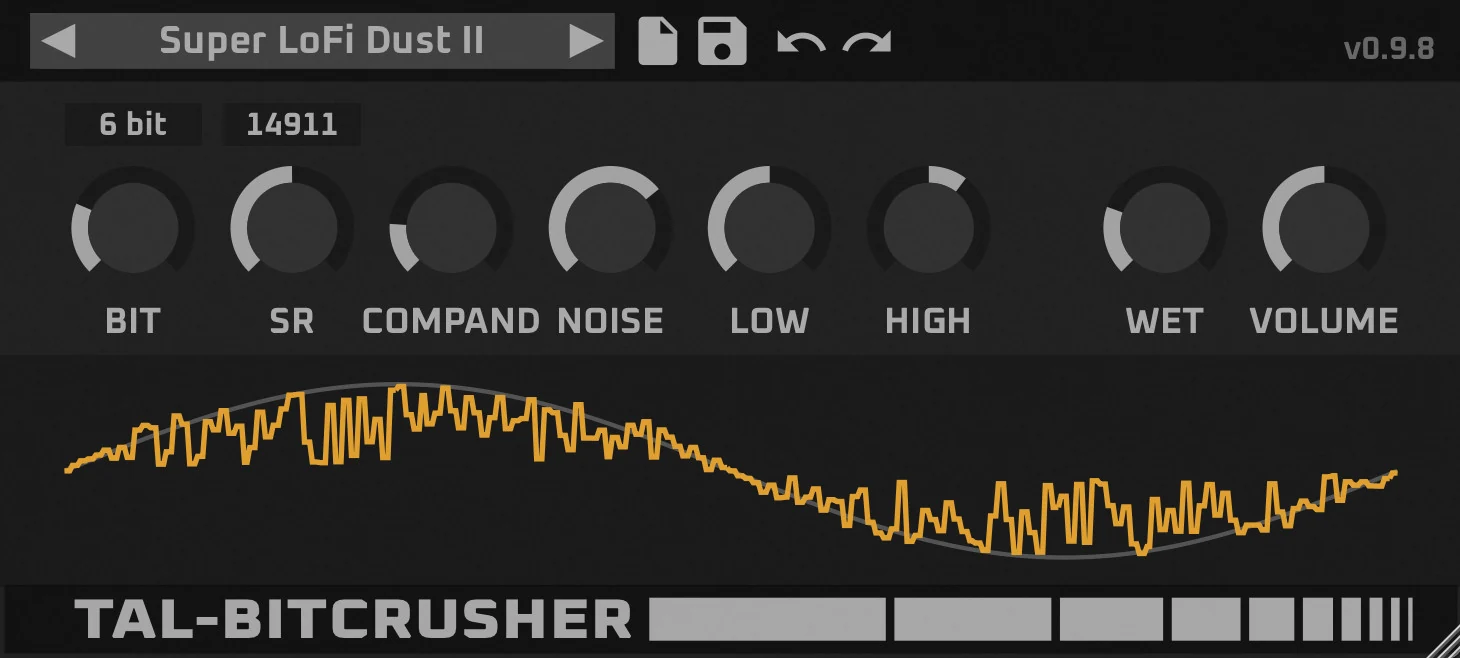
The default answer to “free bitcrusher VST” for years, and TAL has rebuilt it. The current release (version 0.9.9 at the time of writing) keeps the original algorithms in one row of knobs — Bit, SR (sample rate), Noise, Low and High tone, Wet and Volume — and adds a resizable interface, a preset browser and a new Companding parameter that lifts quieter material — in practice it softens the way decays break up, closer to a telephone-style curve than a hard linear crush. Old presets do not load in the new version. It covers more platforms than anything else here: VST, VST3, AU, AAX and CLAP, on macOS 10.11 or later (Apple Silicon native), Windows 10 or later and 64-bit Linux.
Kilohearts Bitcrush
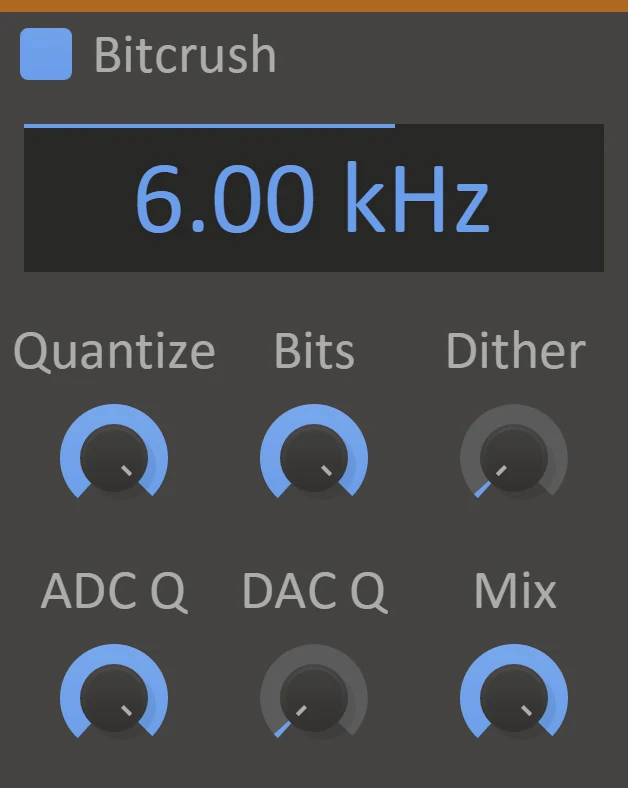
Free with a Kilohearts account, and the most thoughtful control set among the free options. Rate downsamples as low as 200 Hz, Bits sets the quantisation, Dither trades distortion for noise, and two less common knobs — ADC Q and DAC Q — set the quality of the simulated converters on the way in and out, adding low- or high-frequency aliasing respectively. There is a Mix control. It runs as a normal VST, VST3, AU or AAX plugin on macOS and Windows, and as a Snapin inside Kilohearts’ Phase Plant, Multipass and Snap Heap, where you can modulate every parameter.
Tritik Krush 2 (and the free Krush 1)
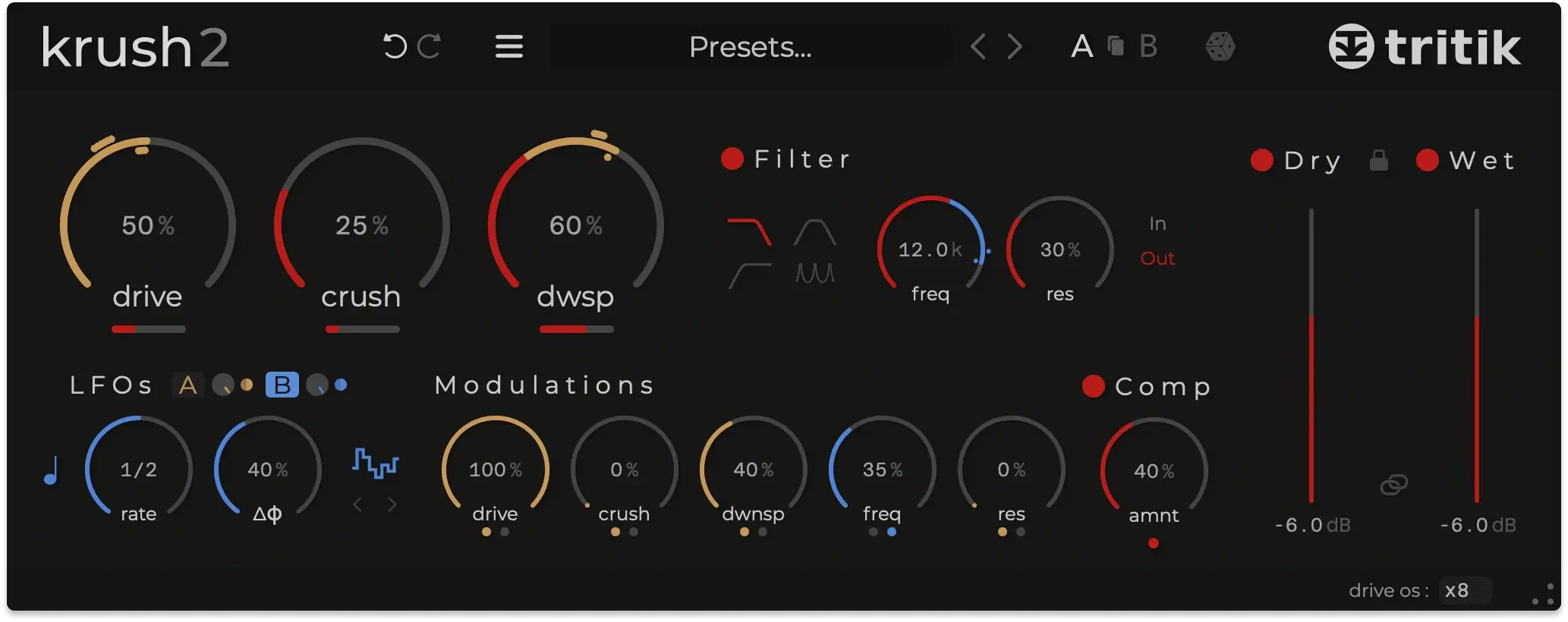
Krush started as a much-recommended freebie. The current Krush 2 costs €10 and adds a lot for the money: bit-depth and sample-rate reduction with jitter and dither, a drive stage with up to 8x oversampling, analog-modelled resonant filters plus comb and band-pass types that can sit before or after the crusher, a one-knob compressor, and two stereo LFOs for movement. The original Krush 1 is still offered as a free legacy download, but it is no longer maintained. Krush 2 runs on macOS 10.15 or later (VST3, AU, AAX) and Windows 10 and 11 (VST3, AAX).
Best paid bitcrusher plugins
Paying for a bitcrusher buys you control over the character of the reduction — which converter, which filter, which kind of error — rather than more of it.
D16 Group Decimort 2
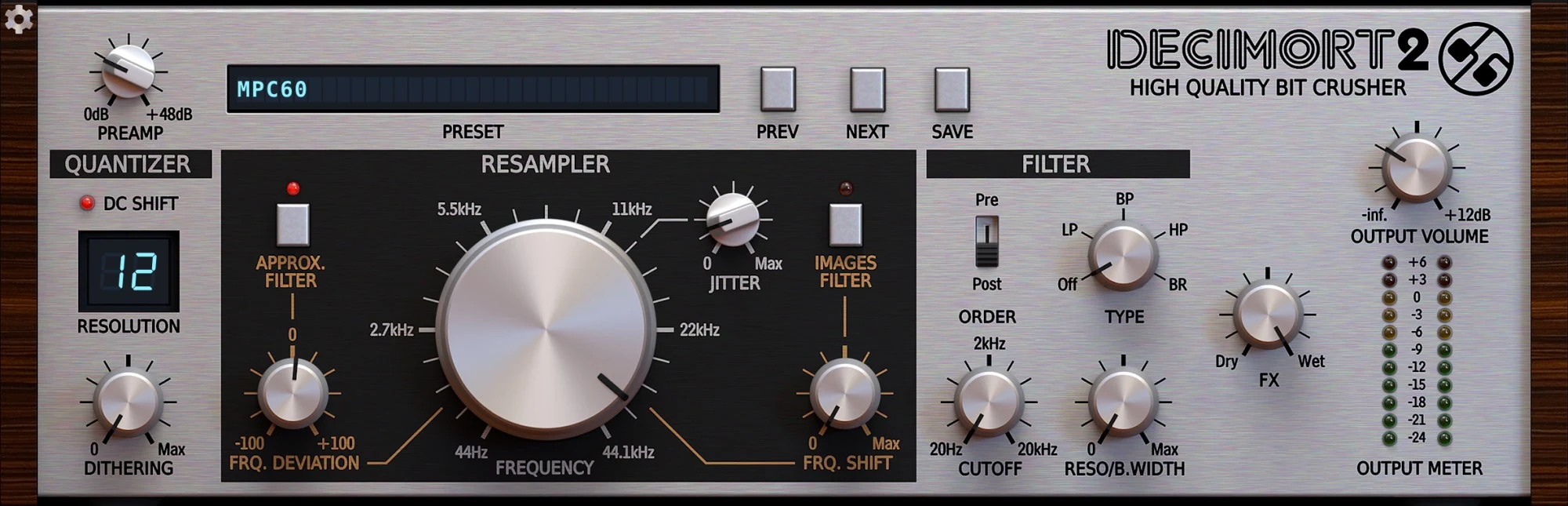
The deepest classic bitcrusher. D16 describes the resampler as emulating the conversion of classic samplers — early Akai and E-mu units among them — with no aliasing of its own beyond what it models. The quantiser offers both mid-tread and mid-rise methods (see above), dither is adjustable, and jitter adds random variation to the resampling clock. The anti-alias pre-filter and the image filter after the resampler can each be switched in, which lets you choose between the clean-but-dark sound of a filtered sampler and raw foldover. A resonant multimode filter can sit before or after the crusher. €59; VST2, VST3, AU and AAX on macOS and Windows; no standalone.
Inphonik RX950
A single-purpose plugin that does one thing: run audio through a model of the Akai S950’s AD/DA conversion, including its 12-bit resolution, its steep low-pass filter and the extra grit you get by driving its input. An audio-bandwidth control sets the target sample rate, as on the original. Where Decimort 2 gives you the parts to build a sampler sound, RX950 gives you one specific sampler that a lot of hip-hop was made on, for $19. VST2, VST3, AU and AAX on macOS and Windows, with Linux VST2.
Unfiltered Audio Lo-Fi-AF
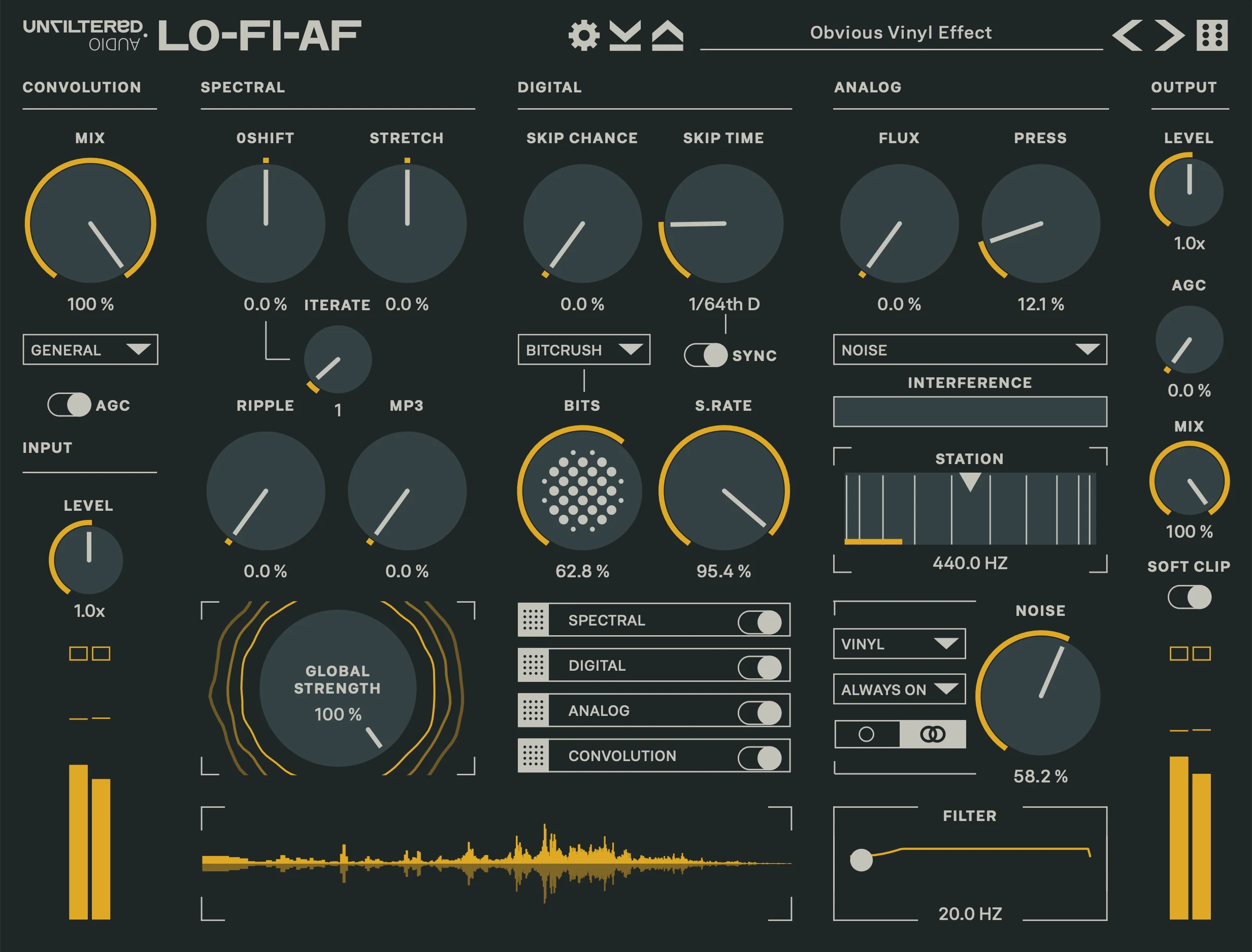
Bitcrushing as one module of four. The Digital section handles bit crushing, sample-rate degradation and CD skipping; Spectral adds pitch shifting and MP3-style artifacts; Analog covers radio interference, tape saturation, vinyl noise and wobbly motors; Convolution runs the result through impulse responses of broken microphones and old speakers. The modules can be reordered. It is the plugin to buy if “lo-fi” for you means a whole degraded playback chain rather than one effect. $75 from Plugin Alliance; VST2, VST3, AU and AAX on macOS 13 or later and Windows 10 and 11.
Goodhertz Lossy
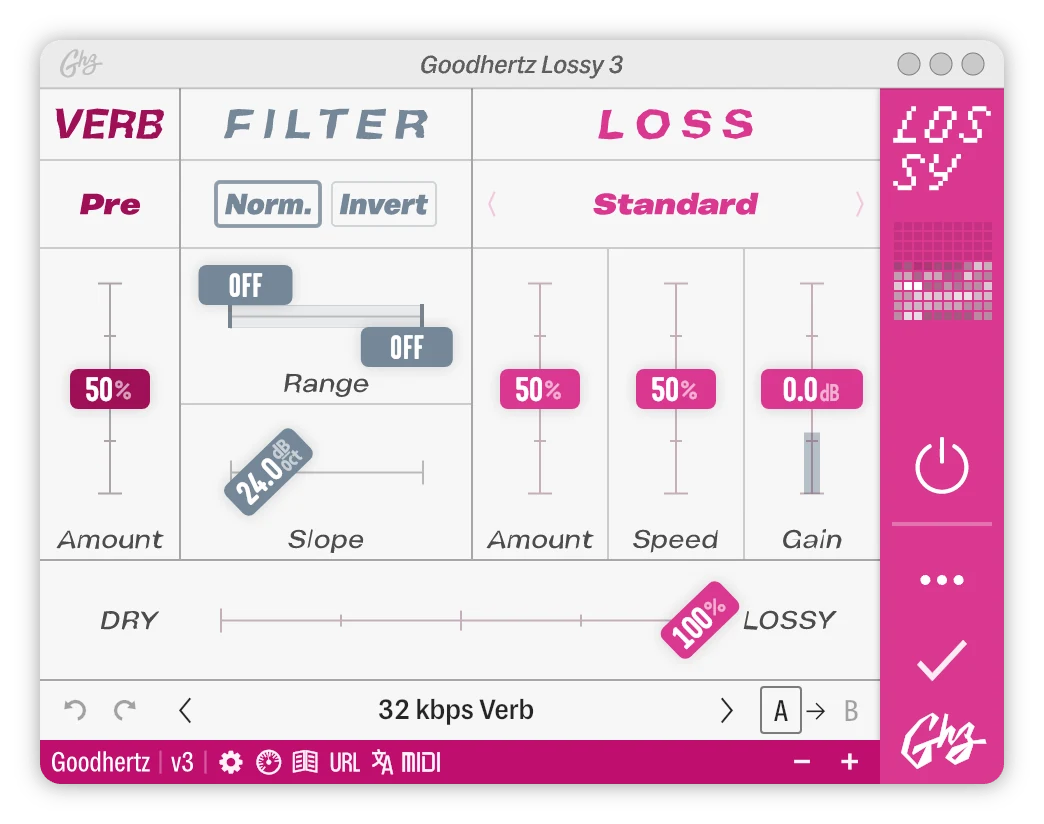
Not a bitcrusher in the narrow sense, but it is what many people are looking for when they search for one: the sound of a low-bitrate MP3, early streaming or a cellphone call. Goodhertz is open that Lossy is a creative tool and does not reproduce any particular codec. Its Loss section has modes including Standard, Inverse, Phase Jitter, Packet Repeat and Packet Loss, with amount and speed controls, plus a filter and a small reverb that can go before or after the loss. $79 with a 30-day trial; AU, VST, VST3 and AAX on macOS 10.13 or later, VST, VST3 and AAX on Windows 10 or later.
Sonic Charge Bitspeek
A real-time pitch-excited LPC codec — the same family of technique behind talking toys and secure military voice links. Bitspeek analyses the input for pitch, volume and formants, then resynthesises it from an oscillator, noise and a filter. On a voice that gives you anything from toy-robot speech to a vocoder or talkbox sound; on drums it does something stranger. Pitch can be played from MIDI, and a formant-freeze effect syncs to tempo. $33 with a three-week trial; VST, VST3 and AU, on macOS and Windows.
Plogue chipcrusher
The most direct competitor to the codec idea for game and computer sounds. chipcrusher resamples audio to a virtual rate and then encodes and decodes it with one of 16 methods taken from old consoles and computers — PCM, DPCM, the SNES’s BRR, A-law and μ-law, CVSD, PWM and LPC10 among them — with adjustable DAC bit weighting. On top of that it adds the SNES-style echo, looped background noise recorded from vintage hardware, and a convolution stage built from impulse responses of old machines. VST3, CLAP, AU and AAX on macOS, Windows and Linux. Plogue’s product page did not show a price when we checked, so confirm it there.
Telecom: codec and transmission bitcrushing
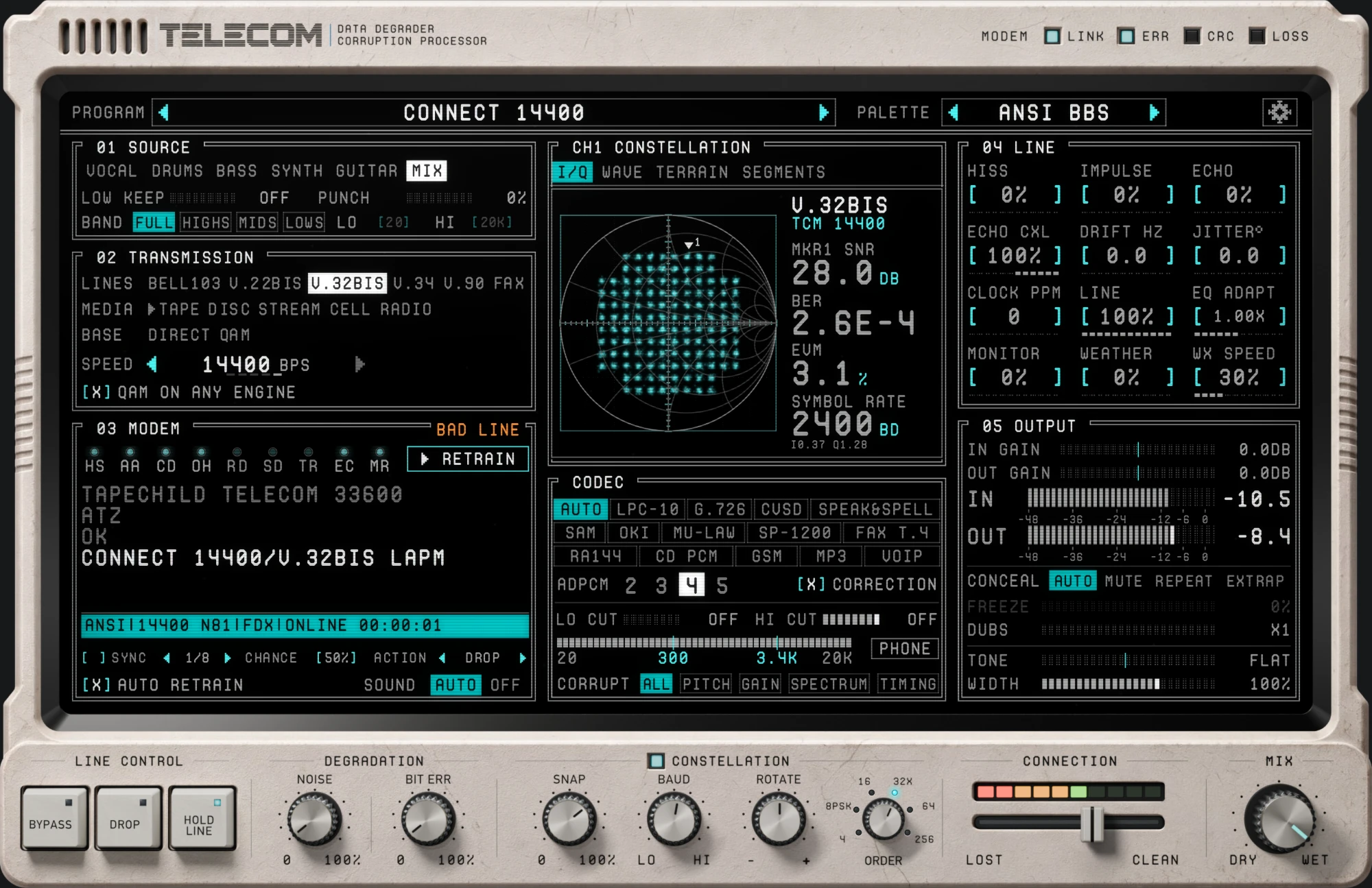
Telecom is Tapechild’s own plugin, so weigh this section accordingly. It is a bitcrusher in the historical sense described above: instead of a Bits and a Rate knob, it encodes your audio with a real codec, sends the bits through an emulated transmission path, damages them on the way and decodes whatever survives.
There are 13 transmission engines — modem standards from Bell 103 through V.22bis, V.32bis, V.34 and V.90, plus fax, a GSM cell link, HF radio, cassette loaders for machines like the ZX Spectrum and Commodore 64, a CD player that skips and stalls, and early web streaming. Two more are the closest it comes to a classic crusher. DIRECT runs only the codec plus raw bit errors at a sample rate between 4 and 22.05 kHz, with no line at all. CONSTELLATION snaps audio to the points of a modem’s QAM or PSK grid, from 4-QAM up to 256, with near-zero latency, and can stack on any other engine — quantisation in two dimensions rather than one.
The 14 codecs include LPC-10, G.726 ADPCM at 2 to 5 bits, CVSD, μ-law, OKI ADPCM from arcade boards, GSM full rate, RealAudio 14.4, an SP-1200-style 12-bit mode, a Group 3 fax mode that turns sound into a printed page and back, MP3-era and VoIP characters, and 16-bit CD PCM. Any codec runs on any engine; on AUTO, each engine picks the codec historically matched to it.
Around that are the controls a mix needs. CONNECTION pulls line quality down from clean to lost, and MIX blends the damage in. LOW KEEP leaves the sub untouched while everything above it is degraded, and BAND confines the damage to a frequency range you choose. SYNC locks failures to the DAW tempo, DROP triggers a dropout on demand, and WEATHER drives line impairments from a chaotic attractor, so storms come and go rather than repeating like an LFO. It runs as VST3, AU and standalone on macOS 11 or later (Universal 2) and Windows 10 and 11 (64-bit); $69, one licence for both systems.
The same six-second drum loop, dry and through Telecom’s V.34 engine with the G.726 ADPCM codec at 4 bits and packet loss on the line. Switch while it plays: compare how the hats and the snare attack smear, instead of simply stepping the way a 4-bit linear crusher would.
A bass part, dry and encoded with CVSD — one bit per sample — with bit errors added. Listen for the growl where the waveform moves faster than the codec’s steps can follow, a kind of distortion a Bits knob does not produce.
One full track, six kinds of crush
Short loops flatter any effect, so here is the full-length track from the Telecom page run through six engines. Every render is offline, at the engine’s default settings, and sample-aligned with the dry file, so switching while it plays keeps your place in the song. Levels are not matched: some engines come out a few dB quieter, as they do in the plugin. For reference, 99% of the dry track’s energy sits below about 7.9 kHz; the bandwidth figures in each caption are measured the same way on the first minute of each render.
DIRECT is the nearest thing in Telecom to a plain bitcrusher: the codec and raw bit errors at a sample rate you set between 4 and 22.05 kHz, with no transmission line in between. At the default setting the top end narrows to about 5.2 kHz.
CONSTELLATION snaps the audio to the points of a modem’s QAM or PSK grid: quantisation in two dimensions instead of one. The result keeps about 3.4 kHz of bandwidth; the engine is built with drums and bass in mind, and adds almost no latency.
The V.90 engine on AUTO pairs a 56k line with the μ-law (G.711) codec: 8 bits per sample on a logarithmic scale, the way the digital phone network carried every call. Quiet passages keep more detail than they would at linear 8 bits, and the band stops at about 5.7 kHz.
CELL sends the track over an emulated GSM mobile link with the GSM full-rate codec, a speech coder built for voices, not music. Around 2.8 kHz survives, and music pushed through a coder designed for one voice at a time is where the mobile-phone colour comes from.
TAPE loads the track the way a home computer loaded software from cassette, with the speed wobble and wear that came with it. It keeps more top end than the phone-line engines, about 4.9 kHz, and comes out about 4.5 dB quieter than the dry track.
DISC uses 16-bit CD PCM, so at a clean setting it barely touches the sound. Pulled down to LOST, the faults the engine models — scratches, skips, stuck loops and bad reads — take over and the top end falls to about 6.1 kHz. A reminder that crushing is not only about resolution: the damage can be in time, too.
Who Telecom is for
Producers who want digital damage with a source — a phone call, a modem, a scratched CD, a stalled stream — and who want it to move over time: retrains, dropouts and storms that can be synced or automated as part of an arrangement.
Who it is not for
Anyone who wants a quick 8-bit crunch on a snare. TAL-Bitcrusher or Kilohearts Bitcrush does that for nothing, with less to learn. If you want a precise model of one sampler, RX950 or Decimort 2 is more direct; for chip-console encodings, look at chipcrusher.
Bitcrushers already in your DAW
Most DAWs ship a capable crusher, and for a lot of work it is all you need. The stock devices also make good reference points: once you know what your DAW’s crusher can’t do, you know what to buy.
| DAW | Device | What it offers |
|---|---|---|
| Ableton Live (Intro, Standard, Suite) | Redux | Rate with jitter, switchable pre-filter and post-filter, Bits, a quantiser Shape curve, DC Shift, Dry/Wet |
| Logic Pro | Bitcrusher | Drive, Resolution from 1 to 24 bits, Downsampling factor, Clip Level with Clip, Wrap and Fold modes |
| Cubase and Nuendo | Bitcrusher | Four modes (two harsher, two gentler), Sample Divider, Depth from 0 to 24 bits; Mix and Output in recent versions |
| FL Studio | Fruity Squeeze | Bit reduction (Squarize), a “Puncher” sample-replacement distortion and filtering |
| Bitwig Studio | Bit-8 | Bitwig’s built-in bitcrusher device |
| Audacity | None built in | Load a free VST3 such as TAL-Bitcrusher, or use the Nyquist quantize function offline |
Redux is the standout. Since its update in Live 11 it has had jitter, independent pre- and post-filters and a Shape control that bends the quantiser curve so quiet detail survives, which covers most of what the paid plugins above add to a basic crusher. Logic’s Bitcrusher is cruder but its Wrap and Fold clip modes give a nastier digital distortion than bit reduction alone.
How to use a bitcrusher on drums, vocals, synths and bass
Numbers below are starting points, not recipes; crushers scale their controls differently, and the right setting depends on the input level. In every case, match loudness when you A/B — crushing usually adds level, and louder reads as better.
Drums
- Parallel first. Put the crusher on a drum bus send at 100% wet and blend it in at 15–35%. The dry transients keep their punch and the crushed layer adds grit to the decays.
- 10–12 bits and 20–26 kHz gets you in the neighbourhood of a 12-bit sampler. Add a low-pass around 10–13 kHz if the plugin has no anti-alias filter, to stop the hats from turning glassy.
- 6–8 bits on the snare alone gives the crunchy, gated-sounding decay of a cheap drum machine. Raise the input trim if the tail breaks up too early.
- Lower the rate on hats and cymbals, not the kick. Hats at 6–10 kHz turn metallic and pitched; a kick through the same setting just loses weight.
Vocals
- Band-limit before you crush. A high-pass around 300 Hz and a low-pass around 3.4 kHz — the old telephone band — then 8 bits at 8–11 kHz reads as a phone or radio voice rather than a broken plugin.
- De-ess first. Sibilance is the loudest high-frequency content in a vocal and it aliases worst; at low rates an “s” becomes a burst of pitched noise.
- Use it on a duplicate. Crush a copy at 100% and tuck it under the lead, or automate the send so only ad-libs and the last word of a phrase get the effect.
Synths and pads
- Sample-rate reduction is the interesting control here. On a sustained chord, aliased partials beat against each other and against the real harmonics, which can make a static pad shimmer. Start around 16 kHz and lower it slowly.
- Modulate it. A slow LFO or automation on Rate gives a sweeping, inharmonic movement no filter can make. Keep jitter low if you want the aliases pitched rather than noisy.
- Bright saws alias hardest. If a lead gets too clangorous, filter the synth before the crusher instead of turning the crush down.
Bass
- Do not crush the sub. A low bit depth turns a sine sub into a stepped wave full of odd harmonics, and it costs headroom and mono weight. Split the bass, or high-pass the crushed parallel copy around 120–200 Hz, and leave the fundamental clean.
- Use the harmonics on purpose. Those same added harmonics are what let a bass read on phone speakers. A crushed upper layer at 8–10 bits can do the job of a distortion pedal.
- Check for DC. Very low bit depths, mid-rise quantisers and offset controls like Redux’s DC Shift can push the waveform off-centre. Put a high-pass at 20–30 Hz after the crusher.
How this guide was put together
Every price, format, OS and control name above comes from the maker’s own product page, manual or plug-in reference, checked in October 2026; where a maker does not publish a figure, we say so rather than guess. We have not run a listening shoot-out of the third-party plugins, so their descriptions explain what the controls do rather than rank how they sound. Plugin screenshots come from each developer’s own product page and are credited under each image. The two diagrams were drawn by us from the arithmetic they illustrate, and the two audio examples are renders from Telecom, our own plugin, with the dry source alongside each.
Frequently asked questions
What is a bitcrusher?
A bitcrusher is a digital distortion effect that lowers an audio signal’s bit depth, its sample rate, or both. Fewer bits round each sample to fewer amplitude levels, which adds quantisation noise and a stepped, buzzy distortion; a lower sample rate folds high frequencies back down as metallic aliasing. It is used for lo-fi, chiptune and glitch sounds, and to add grit to drums.
What is the best free bitcrusher plugin?
TAL-Bitcrusher is the usual pick: free, with bits, sample-rate reduction, noise and a new Companding control, as VST, VST3, AU, AAX and CLAP on macOS, Windows and Linux. Kilohearts Bitcrush is free with an account and adds dither and converter-quality controls. Many DAWs also include one, such as Ableton’s Redux and Logic’s Bitcrusher.
What is the difference between bit depth and sample rate reduction?
Bit-depth reduction lowers the number of amplitude levels, so it changes loudness resolution: more noise, stepped waveforms and decays that break up. Sample-rate reduction lowers how often the waveform is measured, so it changes frequency: high content folds back into the audible band as inharmonic, metallic tones. Most bitcrushers offer both and they are best set separately.
Is 8-bit audio the same as a bitcrusher?
An 8-bit crusher setting reduces audio to 256 levels, but real 8-bit systems sounded different from each other. Telephone μ-law spaces its 256 levels logarithmically so quiet parts stay cleaner, early drum machines used linear 8-bit samples, and game consoles used their own encodings. A plain crusher gives you the resolution of 8 bits, not the character of a specific machine.
Why does my bitcrusher sound harsh and fizzy?
Usually because of aliasing and imaging from sample-rate reduction with no filtering. Add a low-pass before the crusher to remove what would fold back, and another after it to tame the stepped top end, or turn on the anti-alias options if your plugin has them. Mixing the crushed signal in parallel, rather than at 100% wet, also helps.
Is a codec effect a bitcrusher?
In the broad sense, yes: both lower the amount of information used to describe the audio. A bitcrusher does it with one fixed rule per sample, while a codec such as ADPCM, μ-law or LPC adapts to the signal, so its artifacts follow the music. Plugins like Plogue chipcrusher, Sonic Charge Bitspeek and Tapechild Telecom use codec-style encodings rather than plain bit reduction.
Royalty-free WAV
Free sample packs
Royalty-free WAV, play every sample before you download.