
Tapechild UDS-16 vs DrumSpillage 2: Mac or Both (2026)
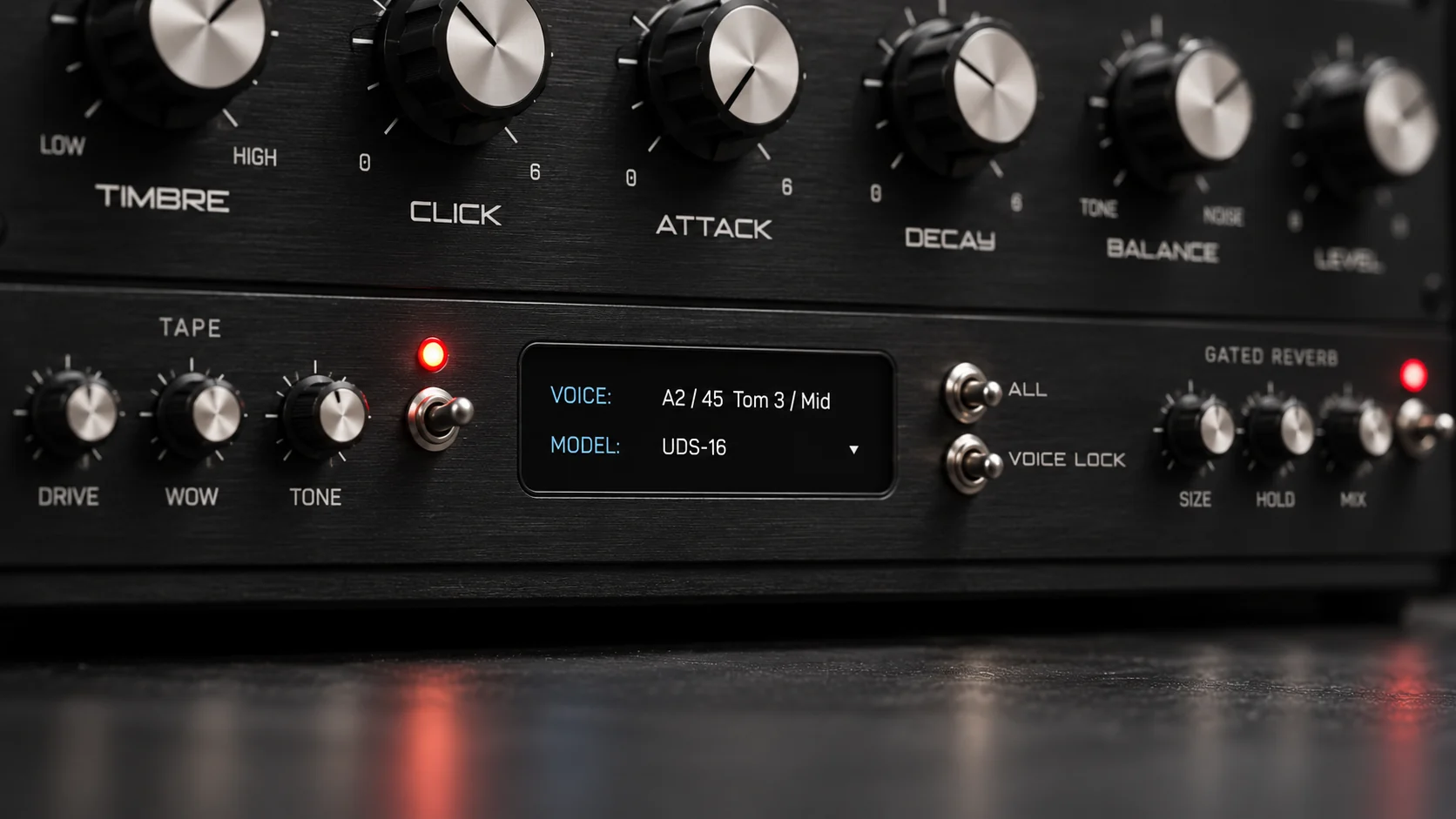
AudioSpillage DrumSpillage 2 is a model-based drum synthesizer with twelve drum models, four LFOs and four envelopes per sound, sold as an Audio Unit for macOS only. Tapechild UDS-16 is a sixteen-voice drum synthesizer with four models drawn from Soviet circuits, sold as VST3, AU and Standalone for macOS and Windows. Pick DrumSpillage if you are on a Mac and want the deeper instrument; pick UDS-16 if you are on Windows, or want a narrower, faster voice with a character DrumSpillage does not have.
The short answer
Choose DrumSpillage 2 if you work on a Mac in an Audio Unit host and want to build drum sounds from the model up. Twelve models cover kick, snare, hat, cymbal, clap, clave, cowbell, wood drum, membrane, noise drum and FM percussion, each with its own parameter set, and every sound gets four LFOs and four envelopes with cross-modulation. Bowed metal, inharmonic clouds, a snare whose noise band wanders through the bar: that range is DrumSpillage’s, and UDS-16 does not reach it.
Choose UDS-16 if you are on Windows, if your host is VST3-only, or if you want a percussion layer that sounds like a specific piece of hardware rather than a general modelling engine. Its four models are circuit-derived: two voicings of a Lel UDS channel, an approximation of the Formanta Rockton, and Tapechild’s own engine. Twelve controls per voice, a Tape stage and a Gated Reverb; you reach a sound in a minute rather than an afternoon. It is the shallower instrument by design, and it costs less.
DrumSpillage 2 vs UDS-16 at a glance
| DrumSpillage 2 | UDS-16 | |
|---|---|---|
| Type | Multi-model drum synthesizer, kit designer | Drum synthesizer, focused voice layer |
| Synthesis | Twelve drum models: analog-style, physical modelling and FM | Four models per drum: UDS-1987, UDS-1988, ROKTON, UDS-16 |
| Voices | Pad count not stated on the official page; sixteen external outputs, keyboard mode | Sixteen independent voices on C2–D#3, each tuned separately |
| Sequencer | None stated | None; timing from the DAW or a controller |
| Presets | Not stated on the official page | Factory kits and single-drum presets for every model |
| Effects | Distortion, filter, 3-band resonator, frequency shifter; 4 LFOs and 4 envelopes per sound | Tape (drive, wow, tone) and Gated Reverb (size, hold, mix); every stage bypassable |
| Formats | Audio Unit only | VST3, AU, Standalone (no AAX, no CLAP) |
| OS | macOS 10.9+, Universal (Intel and Apple Silicon) | macOS 11.0+ Universal 2; Windows 10/11 64-bit |
| Price at time of writing | £89 list, with a seasonal discount running when we checked | $49 one-time (list $79) |
| Try before buying | Demo download after newsletter sign-up | No trial; audio demos on the product page |
| Best for | Sound designers on a Mac who want depth and modulation | Producers on either OS who want a fast, characterful layer |
What DrumSpillage 2 does
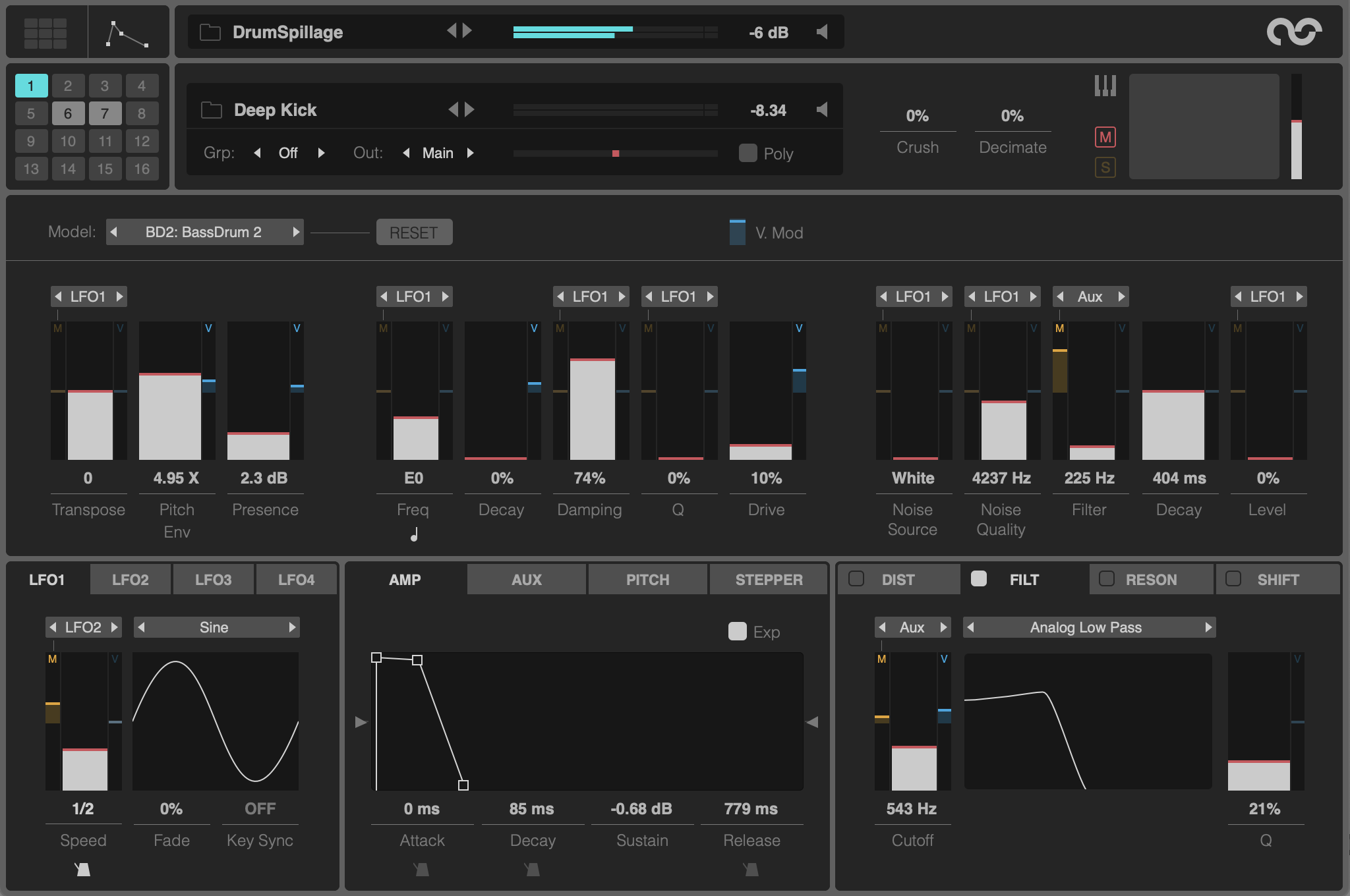
DrumSpillage is at version 2.1.1 and describes itself as a model-based drum synthesizer for macOS. The twelve models are Bass Drum, Bass Drum 2, Snare Drum, Wood Drum, Synth Clap, Cow Bell, Clave, Hi-Hat, Cymbal, Membrane, Noise Drum and FM Percussion. Each is a separate algorithm for one family of sound: Bass Drum has dual oscillators with FM, Membrane is modelled on a suspended metal sheet, Noise Drum runs four band-pass-filtered noise oscillators, and FM Percussion is described as a small FM synth in its own right.
Behind every model sit four LFOs and four envelopes, with cross-modulation so an LFO’s rate can itself be driven by another LFO or an envelope, and almost every control can be modulated by MIDI velocity. Distortion and filter effects follow the model, then a 3-band resonator and a frequency shifter. Each sound has a choke group and a mono/poly switch, sixteen external outputs feed your DAW mixer, and a keyboard mode spreads one sound across the whole MIDI range. There is a built-in WAV/AIFF export for bouncing a hit into a sampler.
The platform line is short and firm: macOS 10.9 or later, Universal for Intel and Apple Silicon, any Audio Unit host. No VST, no Windows. A demo is available after signing up to the AudioSpillage newsletter. Official DrumSpillage page
What UDS-16 does
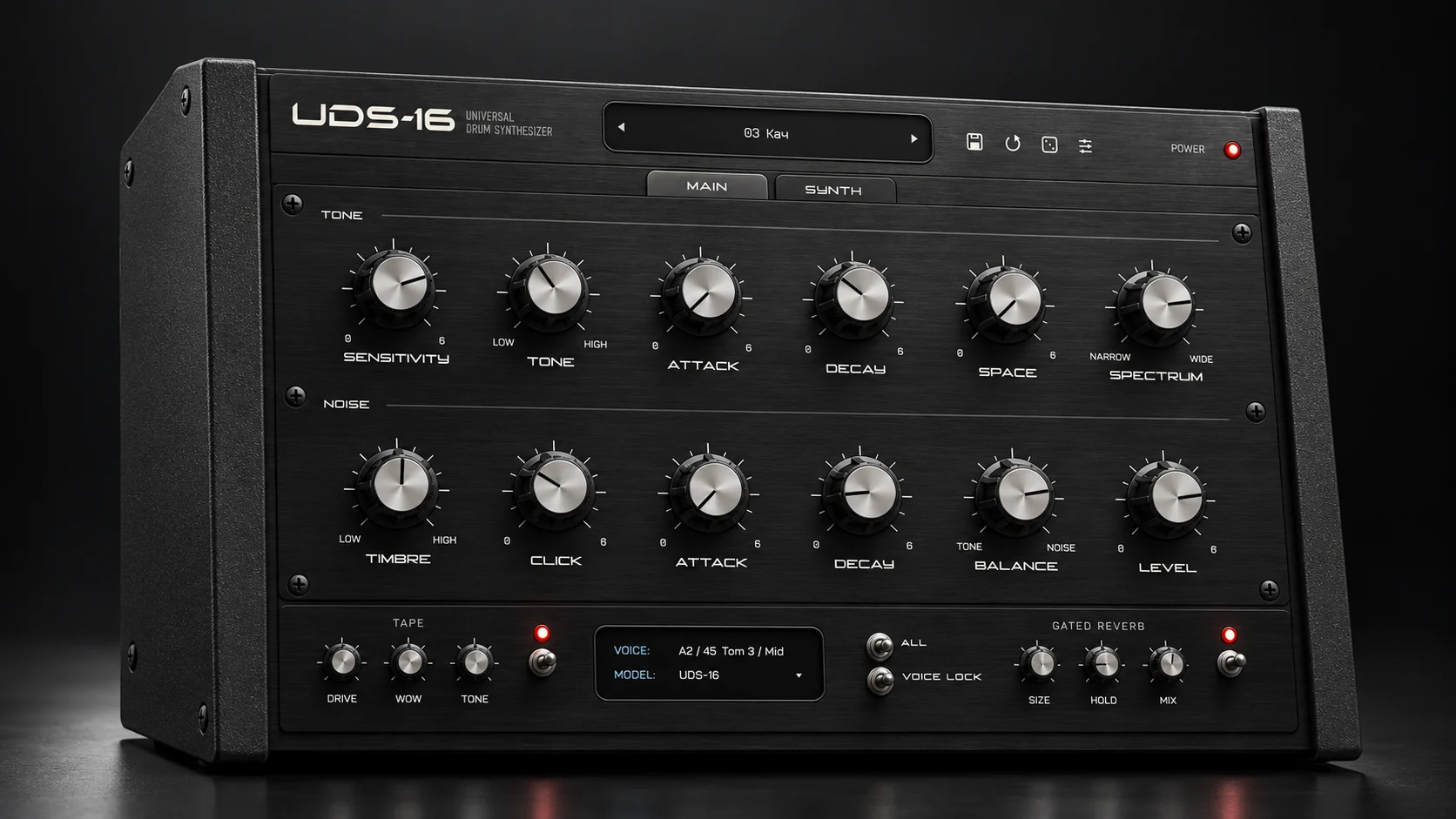
UDS-16 is a sixteen-voice drum synthesizer. The voices sit on MIDI notes C2 to D#3, each is tuned independently, and every hit is synthesized when it plays: no sample library, no sample import, no round-robins. Each voice picks one of four models. UDS-1987 is a circuit model of a channel from the Soviet Lel UDS, with a free-running tone, raw digital noise, a resonant click and an output stage that bites when pushed. UDS-1988 is a second voicing of the same channel, kept separate because the same knob positions land differently. ROKTON is inspired by the seven-channel Formanta Rockton, the box collectors call the Soviet 808, expanded to a sixteen-voice kit; its noise chain is an approximation, not bit-exact. UDS-16 is Tapechild’s own engine with no hardware original: a pitched body with its own pitch envelope, harmonics, a noise layer, a short transient, six inharmonic partials and a drive stage.
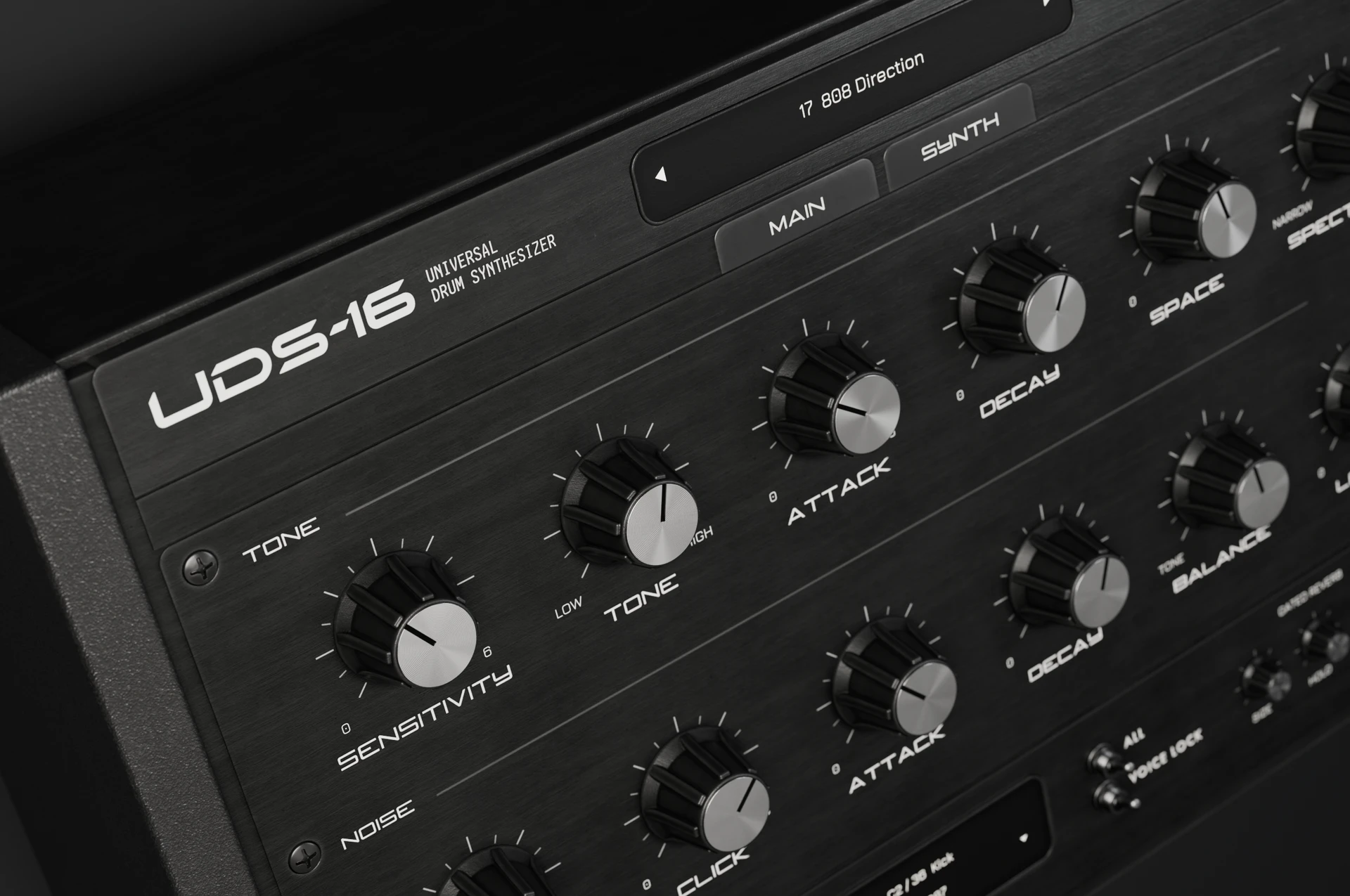
The main panel is the same for every model. A Tone section carries sensitivity, tone, attack, decay, space and spectrum; a Noise section carries timbre, click, attack, decay, balance and level; velocity changes the response. After the voices come a Tape stage with drive, wow and tone, and a Gated Reverb with size, hold and mix. Every stage can be bypassed, and the engine runs at up to 4× oversampling. Factory kits and single-drum presets ship for every model. Tapechild is not affiliated with the makers of the Lel UDS or the Formanta Rockton, and UDS-16 is not sold as an exact emulation of either. It was released in September 2026, so it is a young product from a small studio. Our guide to Soviet drum machines covers the hardware the models come from.
Sound and synthesis
The two plugins disagree about what a drum model should be. DrumSpillage gives each drum family its own algorithm with its own controls, so the Cymbal model and the Clave model share nothing except the modulation system around them. UDS-16 gives every voice the same twelve controls and changes what those controls do underneath by swapping the model. The first is wider; the second is quicker to learn, because decay and spectrum mean the same thing on all sixteen voices.
A kick. In DrumSpillage you choose between Bass Drum, with dual oscillators, several waveforms and FM, and Bass Drum 2, an analog-style model with pitch, decay and transient attack. The pitch envelope is custom, so the drop from click to body can be any shape, and an LFO on pitch or decay will make the kick change across a bar. In UDS-16 a kick is a low tone with a short pitch envelope and a fast decay; the UDS-1987 model adds the Lel’s resonant click, and pushing sensitivity drives the output stage into the bite the hardware is known for. It sounds like one specific Soviet machine, which is the point and the limit.
A snare. DrumSpillage’s Snare Drum model is built to run from classic TR-style snares to modern ones, and Synth Clap and Noise Drum are separate models if you want the snare to be mostly noise. In UDS-16 the snare is the Tone section for the body and the Noise section for the rattle, balanced against each other with the balance control; the ROKTON model gives the noise a coarser, Rockton-like grain, and the Gated Reverb behind it is where the 1980s gated snare lives. UDS-16 does not have a dedicated clap model; a clap is a short noise voice with a fast attack.
A hat. DrumSpillage has a Hi-Hat model with dual filters, oscillators and noise generators, a Cymbal model with dynamic filter control, and Membrane and Cow Bell for metallic partials. UDS-16 builds a hat from the Noise section, shaped by timbre and decay, with the UDS-16 model’s six inharmonic partials for a metallic edge on the Tone side. It makes a good raw digital hat; it will not produce a ride cymbal with a bell.
What each cannot do, plainly. DrumSpillage has no circuit model of any particular machine: it can approach an 808 or a Rockton by ear, but it is not modelling one, and that is not its aim. UDS-16 has no LFOs, no free-assignable envelopes, no resonator and no frequency shifter; a sound moves by velocity and by automation from the DAW, not by internal modulation. If a drum that evolves on its own is the brief, DrumSpillage wins. If a drum that sounds like a Lel UDS on the first hit is the brief, only one of the two does that. The how drum synthesis works guide explains the tone, noise, click and envelope stages both plugins are built on.
Workflow: sequencing, presets and the DAW
Neither plugin has a step sequencer. The DrumSpillage page does not mention one, and UDS-16 has none, so in both cases the pattern lives in your DAW or on a MIDI controller. The workflow comparison comes down to how fast you get to a sound and how the plugin hands audio back to the mixer.
DrumSpillage sends sixteen external outputs to the DAW, gives each sound a choke group so a closed hat can cut an open one, and can bounce a finished hit to WAV or AIFF from inside the plugin. Keyboard mode plays one sound chromatically across the keyboard. The official page does not list a preset count, and with four LFOs and four envelopes per sound the depth is in the editing rather than in the browser; expect to spend time.
UDS-16 ships factory kits and single-drum presets for every model, and because every voice shares one panel, editing is fast: pick a model, move twelve controls, done. The Standalone build lets you audition a kit without opening a project. The trade-off is that it is a smaller ecosystem: a young product, a small preset library, and no way to modulate a parameter except from outside.
Formats, price and licensing
This is the section that decides it for a lot of readers. DrumSpillage 2 is an Audio Unit and nothing else. It needs macOS 10.9 or later and runs Universal on Intel and Apple Silicon, in any AU host. On Windows, or in a host that does not load Audio Units, DrumSpillage is not an option, however much the synthesis appeals. UDS-16 runs as VST3, AU and Standalone on macOS 11.0 and later, Universal 2 for Apple Silicon and Intel, and as VST3 and Standalone on 64-bit Windows 10 and 11 with a signed installer. It has no AAX, no Linux build and no CLAP, so Pro Tools users are out on both sides.
DrumSpillage 2 is listed at £89 in the AudioSpillage shop, which bills in pounds, euros or US dollars through PayPal, and a seasonal discount was running when we checked. Teachers and students in full-time education can claim a 25% discount. A demo is available after signing up to the newsletter. UDS-16 is $49 one-time at the time of writing, against a list price of $79, with no subscription and free updates within the UDS-16 line. The licence activates on up to three computers, online or offline, with no iLok. There is no trial version; the product page carries audio demos instead.
Which one should you buy?
Buy DrumSpillage 2 if…
You work on a Mac in an Audio Unit host; you want twelve distinct drum models rather than one panel; you design sounds that move on their own through LFOs and envelopes; and you want sixteen outputs, choke groups and in-plugin WAV export so the drums can be finished in the DAW mixer.
Buy UDS-16 if…
You are on Windows, or your host takes VST3 and not AU; you want a percussion layer that sounds like Soviet hardware from the first hit; you would rather move twelve controls than program a modulation routing; and you already own a kit for the general-purpose drums and need a voice, not a workstation.
Can you run both? On a Mac, yes, and the two overlap less than the category label suggests. DrumSpillage supplies the wide palette and the evolving, modulated sounds; UDS-16 supplies the Lel and Rockton voices and the Tape and Gated Reverb colour, and its Standalone build makes it easy to audition outside a project. On Windows the question answers itself, because only one of them installs.
Other UDS-16 comparisons
- UDS-16 vs Microtonic
- UDS-16 vs AIR Drum Synth 500
- UDS-16 vs D16 Nepheton 2
- UDS-16 vs D16 Drumazon 2
- UDS-16 vs Arturia Spark 2
- UDS-16 vs Baby Audio Tekno
- UDS-16 vs VSDS-X
- UDS-16 vs KICK 2
- UDS-16 vs Ableton Drum Synths
- Emergent Drums alternative
- 12 best drum synth plugins
Frequently asked questions
Is UDS-16 a DrumSpillage 2 alternative?
Partly. Both are drum synthesizers with no sample layer and no sequencer, aimed at people who design their own sounds. UDS-16 is the alternative if you need Windows, VST3 or a Standalone build, or if you want circuit-derived Soviet drum voices. It is not an alternative if you want twelve separate models, four LFOs and four envelopes per sound, or a resonator and frequency shifter; DrumSpillage goes deeper there and UDS-16 does not try to.
Does DrumSpillage run on Windows?
No. The official page lists macOS 10.9 or later, Universal for Intel and Apple Silicon, in any Audio Unit host, and no other format or operating system. UDS-16 runs on Windows 10 and 11 as VST3 and Standalone, and on macOS 11 and later as VST3, AU and Standalone. Neither plugin offers AAX for Pro Tools.
DrumSpillage 2 vs UDS-16 for techno and industrial drums?
For techno kicks that move across a bar and for noise percussion that never repeats, DrumSpillage has the tools: FM-enabled Bass Drum, Noise Drum with four filtered oscillators, and LFOs on almost any control. For industrial and EBM textures that lean on a specific hardware grain, UDS-16’s UDS-1987 output stage and Rockton-style noise, followed by the Tape drive, get there in fewer moves. Use the first for the kit and the second for one or two signature hits.
Which is easier to learn?
UDS-16. Every voice shares one panel with twelve controls, so the second drum you program is faster than the first. DrumSpillage has a different parameter set for each of its twelve models and a modulation system with four LFOs and four envelopes, cross-modulation and velocity mapping. That depth is what sound designers pay for, and it is why the first week takes longer.
Does either of them have a step sequencer?
No. UDS-16 has none, and the DrumSpillage page does not mention one. In both cases you sequence from the DAW piano roll or a MIDI controller. For a sequencer inside the plugin, look at a drum machine such as Microtonic or the D16 emulations instead.
Can I try either before buying?
DrumSpillage offers a demo download after you sign up to the AudioSpillage newsletter. UDS-16 has no trial version; the product page carries audio demos of each model. UDS-16 is $49 one-time at the time of writing, against a list price of $79, and DrumSpillage 2 is listed at £89 with a seasonal discount running when we checked.
Once the platform question is settled, the audio demos decide the rest. Explore UDS-16. For how these two sit against Microtonic, Drum Synth 500, KICK 2 and the free options, see our guide to the best drum synth plugins.
Royalty-free WAV
Free sample packs
Royalty-free WAV, play every sample before you download.